Best Expandi Alternative 2026: API, MCP Access & Real Pricing
Expandi's $99-per-seat pricing, its dedicated-IP safety stack, where it stops being the right tool, and how per-account pricing capped at $3,000 compares at 5, 30 and 300 accounts.
By The LinkupAPI Team · Reviewed by Eliott · Updated
Expandi charges $99 a month per LinkedIn seat. For a five-person SDR team, that is $495 and a very safe campaign builder. For a product that connects 300 recruiter accounts, the same meter reads $29,700.
That gap is why most searches for an Expandi alternative are not about features. They come from builders whose account count grows faster than their budget, or whose AI agent needs to decide who to contact.
This guide is honest about both sides. Expandi and an agent-first API do different jobs. Below: what Expandi does, what it costs in 2026, who it fits, where an API is the better tool, and what the maths looks like at 5, 30 and 300 accounts.
Key Takeaways
- Expandi costs $99 per seat per month, $79 on annual billing, with a dedicated IP per account and if-then sequences.
- It is LinkedIn-only. Email and image personalisation come from separate tools you pay for.
- An agent-first API is a different job: your agent or product drives the actions, across LinkedIn, email, and WhatsApp.
- At $99 a seat, Expandi passes $3,000 a month at about 30 seats. Per-account pricing here is $165 for 30 accounts and never goes above $3,000.
What Is Expandi?
Expandi is a cloud-based LinkedIn automation tool that runs campaign sequences from a dedicated IP per account, branches on prospect behaviour with if-then logic, and centralises replies in a smart inbox. It sells per seat, one LinkedIn account each, to SDR teams and agencies that want safe volume without a browser extension.
How Much Does Expandi Cost in 2026?
Expandi's Business plan costs $99 per seat per month, or $79 per seat on annual billing, which their pricing page frames as two months free. A seat is one LinkedIn account. There is no free plan, only a 7-day trial. Agency pricing for 10 or more seats is on request.
Everything in the Business plan is included on every seat:
- Unlimited campaigns and templates, with the smart inbox and duplication prevention.
- Dedicated country-based IP, auto warm-up, and smart limit algorithms.
- Webhooks to push events into HubSpot, Salesforce, or Pipedrive, often through Zapier.
Two costs sit outside the seat price. Image and video personalisation need a Hyperise or Sendspark subscription. Email steps do not exist, so a cold email platform is a second bill. Agency adds roles, client reports, and white-label, priced after a demo.
Who Is Expandi Built For?
Expandi is built for SDR teams and agencies that run LinkedIn campaigns from a dashboard and care first about account safety. Each rep or client account gets its own seat, IP, and warm-up curve. The buyer is a human operator building sequences, not a developer shipping a feature.
It helps to place it against its real neighbours:
- Dripify publishes daily quotas and runs cheaper per user, with lighter safety architecture.
- HeyReach rotates many senders inside one campaign, priced per sender with flat agency tiers.
- Waalaxy is the browser-extension entry point with a hard invitation cap.
What it is not: a data source, an email tool, or something your own software calls to decide the next action.
Why Is an Agent-First API a Different Job?
An agent-first API gives an AI agent or your own product the LinkedIn actions themselves: search, connection requests, messages, reactions, comments, and email lookup as endpoints. The agent decides who to contact, what to say, and when to follow up. There is no campaign builder, because the logic lives in your code or your agent.
That changes who the customer is. With Expandi, a person designs a flow and the tool executes it. With an API, a product team wires outreach into something they ship. A recruiting SaaS adds "message this candidate" to its own interface.
Here is a concrete case. A two-founder recruiting SaaS in Berlin serves 300 recruiters, each with their own LinkedIn account connected inside the product. The agent searches candidates by title and location, reads who reacted to a competitor's hiring post, and queues connection requests the recruiter approves. Every recruiter's next action is different. No campaign builder fits that.
When we tested both approaches, the difference was not speed. It was control. Expandi branches on accept, ignore, and reply. An agent branches on anything it can read.
The same connection pattern is covered in connecting LinkedIn to your product. The AI agent for LinkedIn guide walks through the agent side.
What Does LinkedIn-Only Mean for a Multichannel Sequence?
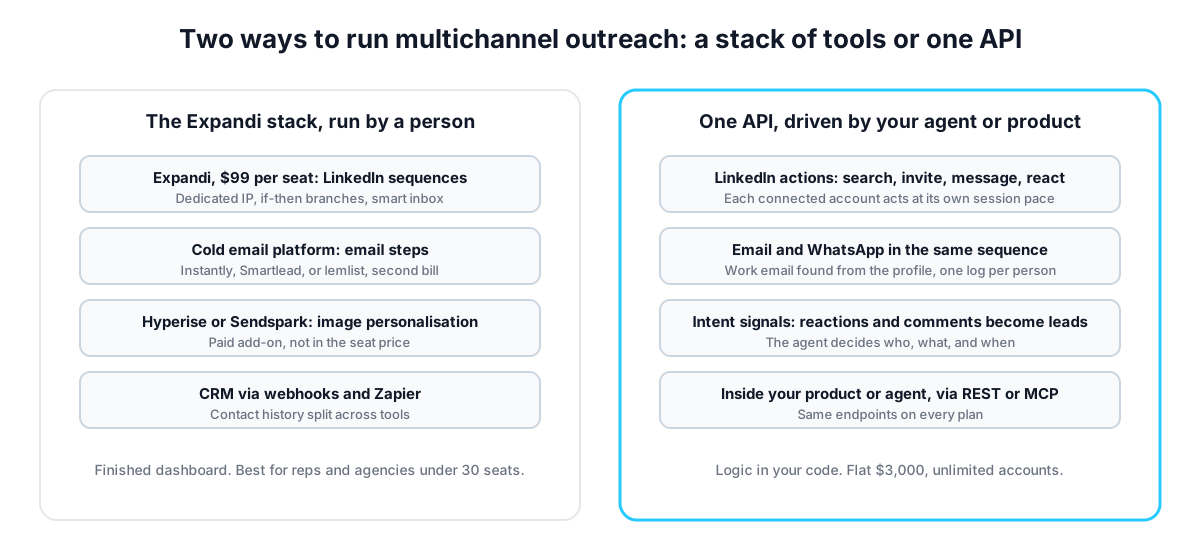
LinkedIn-only means every email or WhatsApp step in your sequence happens in another tool, stitched together through webhooks or a CRM. Expandi has no native email channel, so a follow-up by email needs a second platform, a second bill, and a sync that can drift. An API with all three channels runs the sequence in one place.
The shape is simple. Connection request on Monday. No accept by Friday, the agent finds the work email and sends a short note. Reply lands on WhatsApp, the thread continues there. One sequence, one log.
Expandi teams pair it with Instantly, Smartlead, or lemlist. That works. It also means "did we already contact this person" lives in two systems.
Setup on the API side takes about ten minutes. Get your API key at linkupapi.com, connect an account, and run one multichannel sequence before judging it.
What Changes When Pricing Has a Ceiling?
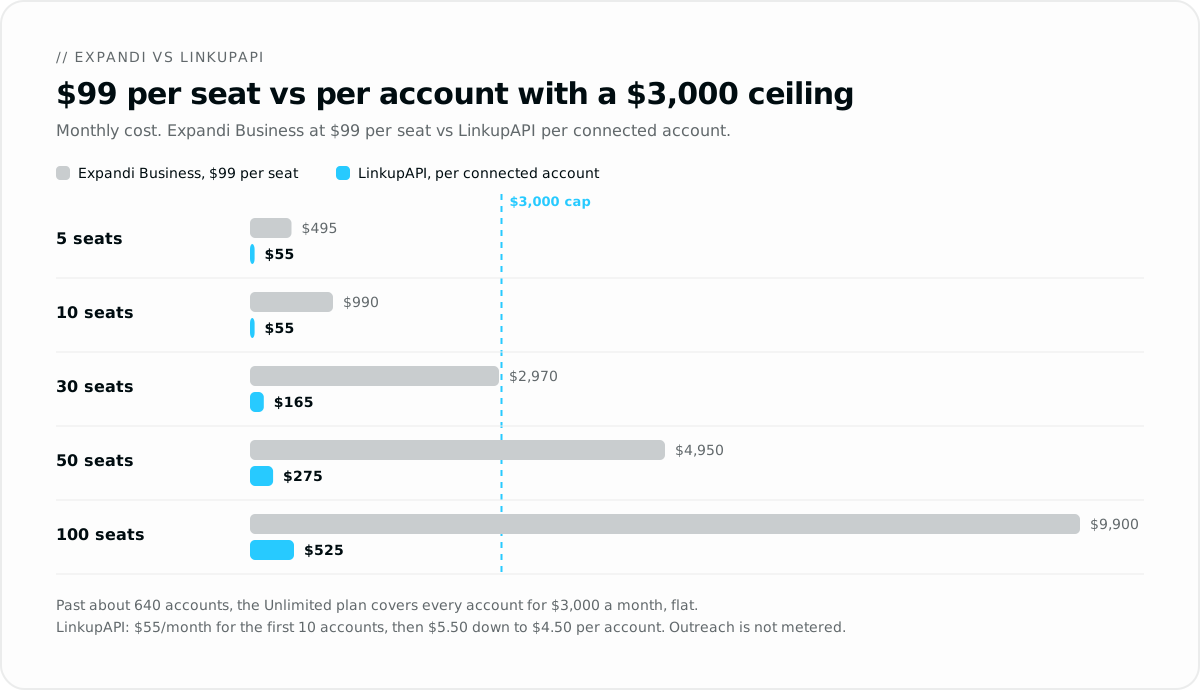
Per-seat pricing means the bill follows your account count with no ceiling. LinkupAPI also charges per connected account, but at a lower rate and with a ceiling: $55 a month for the first 10, then $5.50 each up to 50, $5.00 up to 200 and $4.50 beyond, with unlimited outreach on every account. The bill is capped at $3,000, where the Unlimited plan covers every connected account. At $99 a seat, Expandi reaches $3,000 at about 30 seats. The per-account bill reaches it at about 640.
One more thing about the word unlimited. No tool in this category sells a true unlimited plan. HeyReach's top tier, for example, is capped at 500 senders under a fair-use policy, in the words of its own blog, and the terms above that are negotiated. One agency running about 900 accounts told us its bill there was already above $3,500 a month. The $3,000 Unlimited plan has no fair-use cap on connected accounts. That is the whole point of the ceiling.
Run the numbers at a few sizes:
- 5 seats: Expandi $495 a month. Five accounts on the API cost $55, but with 5 reps in a dashboard, Expandi is the right buy.
- 30 seats: Expandi $2,970 monthly, or $2,370 on annual billing. 30 accounts on the API cost $165.
- 100 seats: Expandi $9,900 a month. 100 accounts cost $525.
- 300 seats: Expandi $29,700. 300 accounts cost $1,475.
Nobody else in the category prices this way, and it only matters if you have accounts to connect. A solo SDR should ignore it. An agency with 40 client accounts cannot.
A second worked example. A lead-gen agency in Austin runs 45 client LinkedIn accounts. On Expandi that is $4,455 a month before the email tool. On per-account pricing it pays $247.50, client 46 adds $5.50, and at 90 clients the bill is $475. It can also run outreach inside its own client portal.
Scaling here means more connected accounts, each at the pace LinkedIn allows from one session. Not one account pushed harder.
The Honest Case for Staying on Expandi
Stay on Expandi if a human builds and runs your campaigns, your team runs a handful of seats, and account safety is your first criterion. The dedicated IP, warm-up curve, and conservative defaults are the best-known safety stack in the category, and nothing about an API replaces a good dashboard for a rep.
Three things Expandi does better than any API for that buyer:
- If-then sequences a non-developer can draw, with conversion visible at every step.
- The post-engagement campaign type, which turns a post's likers into a sequence without code.
- White-label and client reporting for agencies that sell a managed service.
The trade-off is plain. You get a finished tool and per-seat pricing. You give up custom logic and a bill that stops growing. At five reps, that trade favours Expandi.
The mistake most teams make is buying for scale they do not have yet. Buy for the account count you will reach in six months.
How Do You Run a Side-by-Side Test?
The fair test is one workflow, one week, both tools: the same target list, the same connection note, the same follow-up. Expandi runs it as a campaign. The API runs it through your agent. Compare replies, and compare how much logic you could change mid-week without a rebuild.
- Get your API key at linkupapi.com and connect one LinkedIn account. $55 a month covers up to 10 accounts, enough for a real test.
- Connect the MCP server in your agent. In Claude, Settings then Connectors. The same server works with any MCP-compatible agent, and ChatGPT connects through Custom GPT Actions.
- Paste a prompt that mirrors your Expandi campaign: "Find the 40 people who commented on a competitor's launch post, keep Head of Sales and SDR Manager titles, queue a connection request that references their comment, and show me the list first."
- Turn the approved prompt into a scheduled routine, daily at 8am, so the agent runs it without you.
If the API week produced better conversations, you have your answer. If Expandi's inbox felt easier for your reps, that is fair too. The comparisons with Unipile and Zernio follow the same test.
Frequently Asked Questions
How much does Expandi cost?
Expandi's Business plan costs $99 per seat per month, or $79 per seat on annual billing, where a seat is one LinkedIn account. There is a 7-day trial and no free plan. Agency pricing for 10 or more seats is quoted after a demo. Image and video personalisation need a separate Hyperise or Sendspark subscription.
Is Expandi safe for my LinkedIn account?
Expandi's safety architecture is its main selling point: a dedicated country-based IP per account, gradual warm-up, human-like timing, and conservative defaults of about 20 connection requests a day, adjustable to around 40. No automation removes all risk, but Expandi's design is among the most careful in the category.
Does Expandi have an API?
Expandi offers webhooks that fire on events such as a connection accepted or a reply received, and connects to CRMs through Zapier. It does not advertise a public REST API for driving campaigns from your own code. If your product or agent needs to call LinkedIn actions directly, that is the gap an API fills.
What is the best Expandi alternative for AI agents?
For an AI agent, the best alternative is an API that exposes LinkedIn actions the agent can call, with MCP support. LinkupAPI does that across LinkedIn, email, and WhatsApp, with lead search, intent signals, and email enrichment as endpoints. The agent decides who and when. Expandi's sequences decide for you.
Expandi vs LinkupAPI: what is the difference?
Expandi is a campaign builder for people running LinkedIn outreach from a dashboard, priced per seat. LinkupAPI is an API for products and AI agents that embed outreach, priced per connected account from $5.50 down to $4.50, with unlimited outreach and a $3,000 Unlimited plan covering every connected account. Different buyers, different jobs, and at $99 a seat Expandi passes that $3,000 ceiling at about 30 seats.
If you are building something rather than running campaigns, the API is the shorter road. Get your API key at linkupapi.com and connect your first account today.
