Best PhantomBuster Alternatives 2026: 7 Tools Compared
Seven PhantomBuster alternatives compared on published 2026 pricing and the meter each one bills: per seat, per sender, per email, per compute, or per account under a ceiling.
By The LinkupAPI Team · Reviewed by Eliott · Updated
PhantomBuster gives you 130 automations and three meters to watch: execution hours, Phantom slots, and per-step credits. Run out of any one of them and the workflow stops mid-list.
That is why most searches for PhantomBuster alternatives start with the bill, not the feature list. Interest in the brand is down 54% over twelve months on Google Trends. Searches for its pricing are up 190%.
This guide compares seven alternatives on published pricing: four LinkedIn sequencers, one multichannel platform, one general automation platform, and one API built for AI agents. Every price below comes from the vendor's own pricing page, checked in September 2026.
Key Takeaways
- PhantomBuster charges for workspace capacity: 20 to 300 execution hours, 5 to 50 slots, and separate credit pools, from $69 to $439 a month.
- Waalaxy, Dripify, Expandi and HeyReach price the seat or the sender, from 19 EUR to $99 a month each. The bill grows with every account.
- Lemlist meters users and email volume. Apify meters compute.
- An agent-first API replaces script chains with structured actions, and one published $3,000 plan caps cost at any number of connected accounts.
How Do the 7 PhantomBuster Alternatives Compare?
Seven tools cover the search, and they split into three meters. Waalaxy, Dripify, Expandi and HeyReach charge per LinkedIn account. Lemlist charges per user or per email sent, and Apify charges for compute. The seventh option charges per connected account under a $3,000 ceiling, with unlimited outreach, and it is built for an agent rather than a person.
Pick by meter first, features second. A tool that fits your workflow but bills the wrong unit gets expensive in a way no feature fixes.
1. Waalaxy: the cheapest LinkedIn sequencer
Waalaxy is a browser-based LinkedIn sequencer with a fixed invitation cap per plan. Pro costs 19 EUR per user a month for 300 invitations. Advanced is 49 EUR for 800. Business is 69 EUR for 800 plus email sequences. Yearly billing takes 50 percent off.
Best for a solo user or a small team sending a steady trickle. It loses when you outgrow the cap or need the browser closed. Our Waalaxy alternatives guide has the full grid.
2. Expandi: cloud automation with a dedicated IP
Expandi runs in the cloud, one seat per LinkedIn account, at $99 a month or $79 on annual billing. Every seat gets a dedicated country-based IP, auto warm-up and smart limits. Webhooks push events to HubSpot, Salesforce or Pipedrive.
Best for SDR teams that want safety settings without a spreadsheet. It loses on email: there are no email steps, so a cold email platform is a second bill. Details in our Expandi comparison.
3. HeyReach: many senders, one campaign
HeyReach is built for agencies. Growth costs $79 a month per sender, Agency $999 with 25 senders included, Unlimited $2,999. Teammates and clients are free, because the meter is the sender, not the user. Each sender gets a residential proxy and 100 enrichment credits.
Best for an agency running ten to fifty client accounts from one inbox. It loses at the top: the Unlimited tier carries a fair-use cap of 500 senders, in the words of its own blog. See the HeyReach pricing breakdown.
4. Dripify: drip campaigns with team analytics
Dripify costs $59, $79 or $99 per user a month, or $39 to $79 on annual billing. Every paid plan includes LinkedIn and email sequences plus 100 email finder credits. Basic caps you at 20 connection requests a day. Pro opens 75.
Best for a sales team that wants simple drip logic and a manager view. It loses on flexibility: the caps are Dripify's own software limits, and the workflow is linear. Our Dripify guide walks the tiers.
5. Lemlist: multichannel, priced two ways
Lemlist prices its Email plan by volume, from $69 a month for 50,000 emails, and its Multichannel Expert plan at $109 per user with five senders, 400 credits and 400 calling minutes. Signals and lookups burn credits: 5 for a verified email, 50 for a LinkedIn result.
Best for a team that wants email, LinkedIn and calls in one sequence. It loses when the credit meter runs, because a LinkedIn search result costs ten times a verified email. Full math in our Lemlist alternatives guide.
6. Apify: the general automation platform
Apify is the closest match to PhantomBuster's model: a marketplace of ready-made Actors for almost any site, billed on usage and compute, with a free plan to start. It covers far more sites than PhantomBuster, and developers publish their own Actors on it.
Best for a technical team that wants data extraction across the whole web. It loses for outreach. Apify moves data; it does not run conversations, and pairing an Actor with a sender is your job.
7. LinkupAPI: built for an agent, not a person
It is neither a sequencer nor a script library. It is an API and MCP server an AI agent calls to search people, read post reactions, send connection requests and messages, and find work emails, across LinkedIn, email and WhatsApp. Pricing is per connected account: $55 a month for the first 10, then $5.50 each up to 50, $5.00 up to 200 and $4.50 beyond, with unlimited outreach. The bill is capped at $3,000 on the Unlimited plan, with unlimited connected accounts.
Best for products that embed outreach and teams with an agent already in the stack. It loses for a solo marketer who wants to click through a library of scripts this afternoon. The rest of this page explains why it is a different job rather than a rival.
What Is PhantomBuster?
PhantomBuster is a cloud automation toolbox that extracts data from LinkedIn, Sales Navigator, X, Instagram, and Google Maps, enriches it with AI and email lookups, and sends outreach through pre-built scripts called Phantoms. You pick a Phantom, feed it a search URL or a sheet, schedule it, and chain the output into the next one.
Ops people like it because nothing needs an engineer. Each Phantom does one thing: export a search, visit profiles, collect post likers, send a message.
Interest in the brand is down 54% over twelve months on Google Trends, while searches for its pricing are up 190%. People are checking the bill.
How Much Does PhantomBuster Cost in 2026?
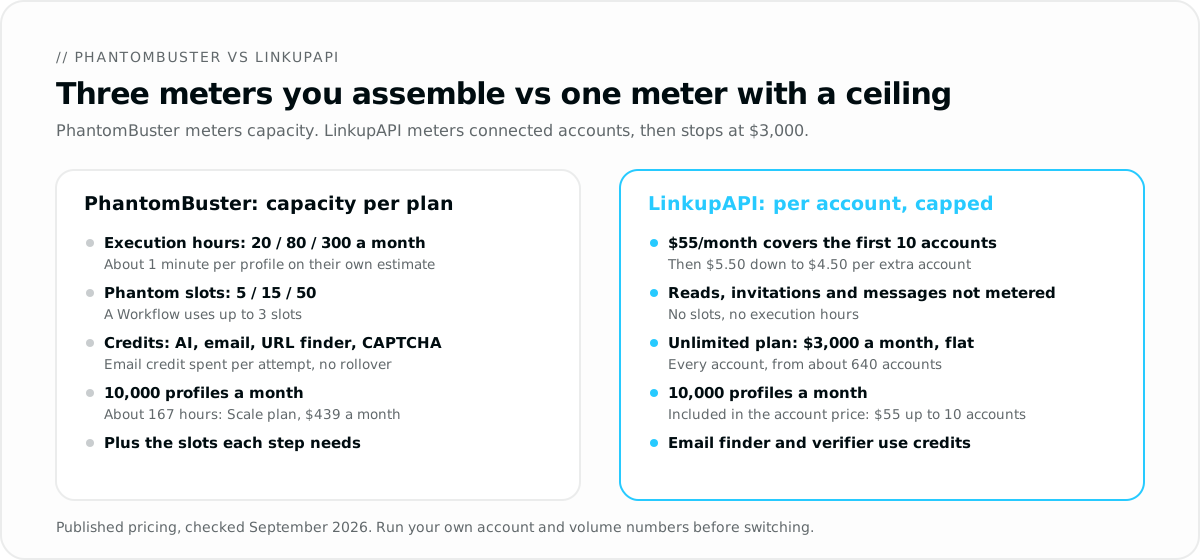
PhantomBuster runs three paid plans: Start at $69 a month, Grow at $159, and Scale at $439, with about 20% off on annual billing. Each plan is a bundle of execution hours, Phantom slots, and credit pools for AI, email discovery, URL finding, and CAPTCHA solving. Plans are workspace-level, shared by up to 100 members.
The published grid, from their July 2026 plan page:
- Start, $69 ($56 annual): 20 execution hours, 5 slots, 10,000 AI credits, 500 email credits, 1,000 URL finder credits, 1,000 CAPTCHA credits, 1 GB.
- Grow, $159 ($128 annual): 80 hours, 15 slots, 30,000 AI, 2,500 email, 10,000 URL, 5,000 CAPTCHA, 10 GB.
- Scale, $439 ($352 annual): 300 hours, 50 slots, 90,000 AI, 10,000 email, 20,000 URL, 30,000 CAPTCHA, 50 GB.
- Free after trial: 30 minutes a month, 1 slot, exports and API capped at 10 rows.
Three details decide the real bill. An email credit is spent per attempt, even with no match, and their docs put the match rate at 30 to 50%. A Workflow uses up to 3 slots. Credits do not roll over.
Execution time is the meter that bites first. Their own estimate is about one minute per profile for the LinkedIn Profile Scraper and about 12 minutes per 1,000 leads for a search export. Ten thousand profiles a month is roughly 167 hours. That is more than double the Grow plan.
Who Is PhantomBuster Built For?
PhantomBuster fits an ops person or a solo marketer who wants to extract lists from several networks, enrich them, and push a sequence without writing code. It sits between a general data platform and a LinkedIn sequencer, and it is honest about being a toolbox rather than a finished system.
Three neighbours help place it:
- Not Apify. Apify is a general web platform with thousands of Actors for any site. PhantomBuster is narrower and friendlier for growth work.
- Not Waalaxy. Waalaxy is a LinkedIn sequencer with a fixed invitation cap. PhantomBuster is a set of parts you arrange.
- Not Clay. Clay orchestrates enrichment across 150 providers in a table. PhantomBuster feeds tables like Clay with raw extractions.
Where it wins is breadth. Nobody else covers LinkedIn, X, Instagram, and Google Maps in one no-code place at this price.
Why Is an Agent-First API a Different Job?
An agent-first API is a different job because the caller is software, not a person. The agent decides who to contact, what to say, and when to follow up, then calls one structured action to do it. PhantomBuster asks a human to arrange Phantoms, files, and schedules in the right order.
Take the most common workflow in both worlds: turn the people who reacted to a competitor's post into conversations.
On PhantomBuster it is a chain. A post likers Phantom exports a CSV. A profile Phantom enriches it, one minute per row. A message sender Phantom reads the sheet and fires. Each step takes a slot, burns hours, and waits on the previous one.
Through an API built for agents, the same thing is a request. Input: the post URL. Output: the reactions and comments as a lead list with role and company. Use case: the agent qualifies the 40 that match, writes each note, and sends the connection requests from your session. No CSV in the middle.
That matters most when outreach lives inside a product. A recruiting SaaS that wants a "message this candidate" button cannot ship a Phantom to its users. It needs endpoints, webhooks, and an MCP server its own agent can call, which is the whole idea behind LinkedIn automation through MCP.
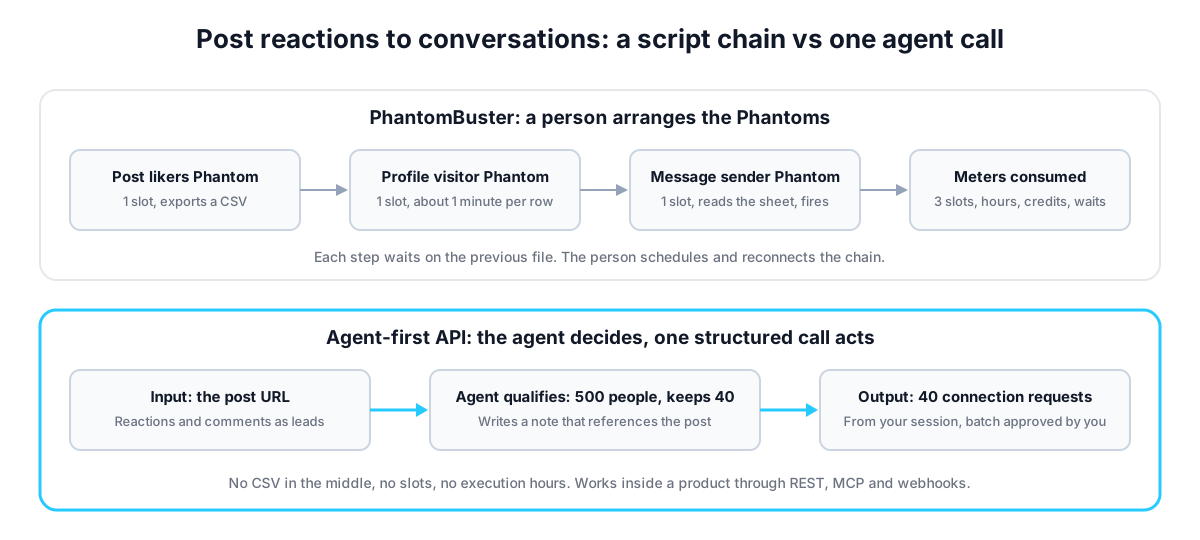
Here is what that looks like for a 2-person team at a Series A dev-tools startup. Their agent watches 30 competitor accounts. Monday, it pulls reactions on the 12 hottest launch posts, about 500 people, keeps 40 engineering managers, and queues 40 requests that mention the exact post. The reps approve the batch over coffee. Get your API key at linkupapi.com to run the same routine.
What Changes When Pricing Has a Ceiling?
A ceiling means the bill stops: accounts cost from $5.50 down to $4.50 each, with unlimited outreach, and the $3,000 Unlimited plan covers unlimited connected LinkedIn accounts, so past about 640 accounts the next one is free. PhantomBuster meters capacity instead, so the bill tracks hours and credits, and every new workflow eats slots.
One more thing about the word unlimited. No tool in this category sells a true unlimited plan. HeyReach's top tier, for example, is capped at 500 senders under a fair-use policy, in the words of its own blog, and the terms above that are negotiated. One agency running about 900 accounts told us its bill there was already above $3,500 a month. The $3,000 Unlimited plan has no fair-use cap on connected accounts. That is the whole point of the ceiling.
Below the ceiling, the meter is the account, not the action. $55 a month covers up to 10 connected accounts, and profile, post and company reads, invitations and messages on those accounts are not metered. Only email finding, email verification and reverse email lookups use credits. Every plan opens all 50+ endpoints.
Run the worked example again. Ten thousand profile reads a month are included in the account price, so a team spreading them across a few connected accounts pays $55. On PhantomBuster the same volume is about 167 execution hours, so you are on Scale at $439, and you still assemble the chain yourself.
The mistake most teams make is comparing headline prices. $69 against $55 tells you nothing. Compare what a month of your actual workflow consumes on each meter. When we tested a weekly extract-enrich-message loop, the slot count was the limit long before the hours were.
Who this fits: teams running outbound at volume with an agent in the stack, agencies with one agent per client, and products that embed outreach. Not a solo user running two Phantoms a week, where $69 and a sheet is enough.
Consider a 3-person GTM agency running 12 client accounts. On a capacity model, twelve weekly loops of extract, enrich, and send need 36 slots and roughly 200 hours, so Scale, and the next client pushes past it. On per-account pricing, twelve accounts cost $66 a month and forty cost $220, each client with its own agent and inbox, and the bill never passes $3,000. The same maths runs through our Unipile alternative guide, where the meter is connected accounts.
The Honest Case for Staying on PhantomBuster
Stay on PhantomBuster if your work is extraction across many networks, done by a person, without code. It covers Instagram, Google Maps, and X, which an outreach API for B2B channels does not touch. For a solo marketer running a few weekly extractions, $69 a month and a spreadsheet is the right size.
You are probably thinking an API means an engineering project. It does not have to. The MCP path is a connector and a key. The trade-off is real, though. You give up a library of ready-made scripts and get actions your agent composes itself. If nobody on the team wants to describe a workflow to an agent, the toolbox is the better home.
One more honest point. PhantomBuster ships its own MCP server, so Claude can trigger a Phantom too. If you only need one script now and then, that is enough.
How Do You Run a Side-by-Side Test?
You run a side-by-side test by picking one workflow you already run on PhantomBuster, running it once through an agent, and comparing three things: setup steps, resources consumed, and what landed in the inbox. Keep the target list identical so the only variable is the mechanism.
- Get your API key at linkupapi.com. $55 a month covers up to 10 connected accounts for a small test; every plan opens all endpoints.
- Connect the MCP server in your agent. In Claude, open Settings, then Connectors, and add it. The same server works with any MCP-compatible agent, and ChatGPT uses Custom GPT Actions.
- Paste a prompt that runs the workflow: "Pull everyone who reacted to this launch post, keep the 40 heads of sales at companies with 50 to 500 employees in the US, draft a two-line note that references the post, and queue the connection requests for my approval."
- Turn the conversation into a scheduled routine, weekly, and compare a month of results against the Phantom chain.
Keep the daily volume modest on both sides. A steady 25 requests a day beats a burst of 200, whatever tool sends them. For the agent side, see our guide to an AI agent for LinkedIn.
Frequently Asked Questions
How much does PhantomBuster cost?
PhantomBuster costs $69 a month on Start, $159 on Grow, and $439 on Scale, or $56, $128, and $352 with annual billing. Each plan bundles execution hours (20, 80, 300), Phantom slots (5, 15, 50), and separate credit pools for AI, email discovery, URL finding, and CAPTCHA solving that reset monthly.
Is PhantomBuster safe for my LinkedIn account?
PhantomBuster runs browser-session automation in the cloud, which is why CAPTCHA-solving credits exist on every plan. Safety depends on volume and pacing more than on the tool. Keep daily actions modest, warm new accounts slowly, and avoid running several Phantoms on one profile at once. LinkedIn restricts scripted bursts from any source.
Does PhantomBuster have an API?
Yes. API access is included on every paid plan, with output capped at 10 rows on Free and Trial. It also ships an MCP server so Claude or ChatGPT can launch Phantoms. The API triggers and reads automations you have already configured; it does not expose outreach actions your agent composes on its own.
Which PhantomBuster alternative is the cheapest?
On headline price, Waalaxy Pro at 19 EUR per user a month, then Dripify at $39 per user on annual billing. On volume, the answer flips: ten thousand profile reads a month fit inside the $55 entry price on an agent-first API, where reads on connected accounts are not metered, while the same workload needs the $439 Scale plan on PhantomBuster. Price the workflow, not the seat.
What is the best PhantomBuster alternative for AI agents?
For an agent that has to act on LinkedIn, email, and WhatsApp, LinkupAPI is the closest fit: structured actions for search, post reactions, connection requests, messages, and email enrichment over REST and MCP, priced per connected account and capped at $3,000 a month. For no-code extraction across many networks, PhantomBuster itself remains the better toolbox.
PhantomBuster vs LinkupAPI: what is the difference?
PhantomBuster is a library of scripts a person assembles, billed by execution hours, slots, and credits. LinkupAPI is an API an AI agent drives and a product embeds, billed per connected account from $5.50 down to $4.50, with unlimited outreach and a $3,000 ceiling for unlimited accounts. One is a toolbox for ops work, the other is infrastructure for agents.
The toolbox is still the right size for many teams. If your outreach is moving into an agent or a product, the meter you want is the one that stops growing. Get your API key at linkupapi.com and test one workflow this week.
