Best Unipile Alternative for LinkedIn 2026: Pricing & Limits
An honest 2026 look at Unipile: what it does well, what per-account pricing costs at scale, and when a B2B outreach API with a bill capped at $3,000 a month is the smarter pick.
By The LinkupAPI Team · Reviewed by Eliott · Updated
Most teams that search for a Unipile alternative are not unhappy with the product itself. They are reacting to a bill that grows with every connected account, or to LinkedIn sessions that keep dropping.
Short answer: LinkupAPI is the best Unipile alternative for LinkedIn outreach, Sales Navigator and AI agents. It covers Sales Navigator and Recruiter search, saved searches and lead lists, profile enrichment, and LinkedIn, email and WhatsApp messages from one API. It bills per connected account and stops at $3,000 a month for unlimited accounts. For email and calendar sync only, Nylas or EmailEngine fit better.
Unipile bills per connected account on a degressive scale. Ten accounts cost €49 a month. Five thousand cost €17,500 at the published rates.
Session drops matter just as much. When a connected LinkedIn account disconnects, the account owner has to log back in and re-link it themselves. If those accounts belong to your customers, every drop becomes a support conversation.
This guide covers what Unipile does well, what it costs in 2026 based on its published tiers, and when an outreach API built for AI agents, with a bill capped at $3,000 a month, is a better fit.
Key Takeaways
- Best Unipile alternative for LinkedIn outreach, Sales Navigator and AI agents: LinkupAPI, with Sales Navigator search and lead lists, the same core messaging actions and a bill capped at $3,000 a month for unlimited accounts.
- Unipile bills per linked account on every channel: €49 a month up to 10 accounts, then from €5.00 down to €3.00 per account, with no ceiling.
- The tier rate applies to every connected account, so the bill grows with each one: €4,200 a month at 1,200 accounts, €30,000 at 10,000.
- When a LinkedIn account disconnects, its owner has to log back in and re-link it.
- LinkupAPI also bills per account, $55 for the first 10 then $5.50 down to $4.50, with unlimited outreach, and the bill stops at $3,000 a month from about 640 accounts.
- For Instagram, Telegram or calendar sync, Unipile remains the better fit.
What Is Unipile?
Unipile is a unified messaging API that connects LinkedIn, WhatsApp, Instagram, Telegram, email, and calendars to your software through one set of endpoints. You link an account once. Your product can then read and send messages on that channel without building each integration yourself.
The product is aimed at software publishers. ATS platforms, CRMs, and outreach tools use it to ship an inbox or messaging feature without maintaining six connectors.
It is a mature product. The catalog spans 500 plus endpoints, the company is SOC 2 and GDPR compliant, and G2 reviewers regularly mention the ease of use and the support team.
For multi-channel messaging inside a SaaS product, it does the job.
Why Do Teams Look for a Unipile Alternative?
Three reasons come up in practice: the per-account bill grows with every connected seat, session drops force end customers to reconnect their accounts, and lead data still requires separate tools. The first two drive most switches.
The pricing meter. Per-account billing is cheap at 10 accounts. At 1,000 it is a real line item. The exact tiers are below.
The reconnect problem. When a LinkedIn session drops, the account owner has to log in and re-link it. If those accounts belong to your customers, you are now emailing customers to ask them to reconnect. In builder forums such as this r/n8n thread on LinkedIn automation, the recurring question is a version of the same worry: "will my account get restricted?"
The extra tooling. Look at how practitioners describe their outreach stacks in public breakdowns. Clay enriches. Crustdata flags signals. Unipile sends. Each piece is a separate subscription.
Which Unipile Alternative Fits Your Use Case?
There is no single replacement for Unipile, because Unipile covers several jobs at once. Pick the alternative that matches the job you actually use it for.
- LinkedIn outreach, Sales Navigator and AI agents: LinkupAPI. Sales Navigator and Recruiter search, saved searches and lead lists, profile enrichment, then connection requests, LinkedIn messages, InMails, email and WhatsApp in the same sequence, an MCP server for agents, and per-account billing capped at $3,000 a month for unlimited accounts.
- LinkedIn automation for a handful of seats: Linked API. A cloud browser per account and 55 plus chainable actions, priced per seat at $49 a month on annual billing ($69 month to month), one seat per LinkedIn account, per Linked API's pricing page.
- Email and calendar sync only: Nylas or EmailEngine. Dedicated mailbox and calendar infrastructure, without the LinkedIn side.
- Social publishing and scheduling: Zernio. Posts and scheduling across social platforms, a job Unipile does not cover.
- Comments, reviews and mentions: SocialAPI.ai. A social engagement API rather than a messaging one.
- Instagram, Telegram and one inbox across consumer channels: stay on Unipile. That breadth is what it was built for.
How Much Does Unipile Cost in 2026?
Unipile starts at €49, about $55, per month, which covers up to 10 connected accounts. Above 10, a per-account rate applies to every connected account, and the rate decreases with volume. Usage is unlimited, with no per-request fees. These are the published tiers, as listed on Unipile's pricing page in September 2026, excluding VAT:
| Linked accounts | Price in EUR | Price in USD |
|---|---|---|
| Up to 10 | €49.00 a month total | $55.00 a month total |
| 11 to 50 | €5.00 per account | $5.50 per account |
| 51 to 200 | €4.50 per account | $5.00 per account |
| 201 to 1,000 | €4.00 per account | $4.50 per account |
| 1,001 to 5,000 | €3.50 per account | $4.00 per account |
| 5,001 and above | €3.00 per account | $3.50 per account |
The rate is degressive, and the tier rate applies to all connected accounts. Unipile's own example: 11 connected accounts cost 11 times €5, so €55 a month.
Worked out at scale: 40 accounts cost €200 a month. 1,200 accounts cost €4,200. 10,000 accounts cost €30,000.
Unipile costs €4,000 a month at 1,000 connected accounts. Our full Unipile review covers its pricing, account safety and LinkedIn limits in detail.
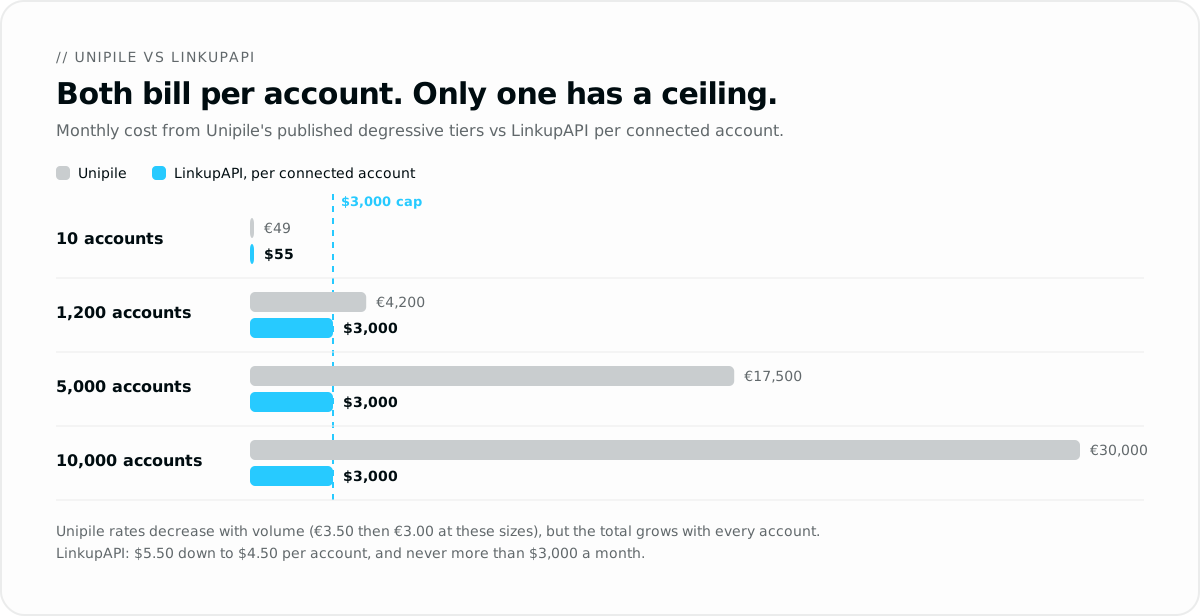
A capped model behaves differently. LinkupAPI also bills per connected account, on a similar scale: $55 a month for the first 10, then $5.50 each up to 50, $5.00 up to 200 and $4.50 beyond, with unlimited outreach. The difference is the ceiling. The bill stops at $3,000 a month, where the Unlimited plan covers every connected account, so the invoice is the same at 5,000 accounts and at 20,000.
Unipile vs Linked API vs LinkupAPI: Which Pricing Model Scales?
The three products bill on three different meters. Unipile charges per connected account on a sliding rate. Linked API charges a flat price per seat. LinkupAPI charges per connected account and stops at a ceiling. The gap only shows once you add accounts:
| Connected LinkedIn accounts | Unipile (published tiers) | Linked API ($49 per seat, annual) | LinkupAPI |
|---|---|---|---|
| 10 | €49 a month | $490 a month | $55 a month |
| 50 | €250 a month | $2,450 a month | $275 a month |
| 1,000 | €4,000 a month | $49,000 a month | $3,000 a month |
| 5,000 | €17,500 a month | $245,000 a month | $3,000 a month |
At 10 or 50 accounts, Unipile and LinkupAPI cost about the same, and Linked API is the premium option. From roughly 640 accounts, LinkupAPI switches to its Unlimited plan and the bill no longer moves. Prices are the published list prices in September 2026, excluding VAT.
What Should You Look for in a Replacement?
Judge any Unipile alternative on four things: how often LinkedIn sessions drop and who has to fix them, where its proxies sit, what the bill looks like at ten times your current account count, and how much integration work sits around the API itself. Check each one against your own roadmap, not a demo account.
| Criterion | What to ask the vendor | Why it matters at scale |
|---|---|---|
| Session stability | How often do linked LinkedIn accounts need to log in again? | Every drop sends one of your customers back to a login screen. |
| Account location | Is each account behind a proxy in its own country? | Logins from an unusual location are a common restriction trigger. |
| Bill at 10x accounts | What is the monthly price at ten times today's account count? | Per-account pricing with no ceiling grows with every signup. |
| Work around the API | Who writes pacing, retries and reconnection handling? | That layer takes months to build and maintain. |
| Agent access | Is there an MCP server, or only REST endpoints? | An MCP server lets Claude or ChatGPT call actions without custom tools. |
For agent-driven setups, our comparison of the best LinkedIn MCP servers goes deeper on that last criterion.
LinkupAPI vs Unipile: What Actually Changes?
The two products overlap on the core actions: connection requests, LinkedIn messages, comments, and email sending. The differences sit in three places: how long sessions stay connected, where the accounts appear to log in from, and how the bill behaves as you grow.
Sessions hold longer. In our experience, connected LinkedIn accounts re-authenticate less often. The connection method was designed to avoid the disconnect and reconnect loop. That matters because a drop is not just downtime: the account owner has to log back in themselves before anything resumes.
Every account gets a local proxy. Each connected account runs behind a proxy matched to its country code. The session's location stays consistent with the account's location.
The bill stops. LinkupAPI caps the bill at $3,000 a month for unlimited accounts. Pricing starts at $55 a month for up to 10 accounts, then runs per account from $5.50 down to $4.50, as listed on the LinkupAPI pricing page. The Unlimited plan covers every connected account, same price at any scale.
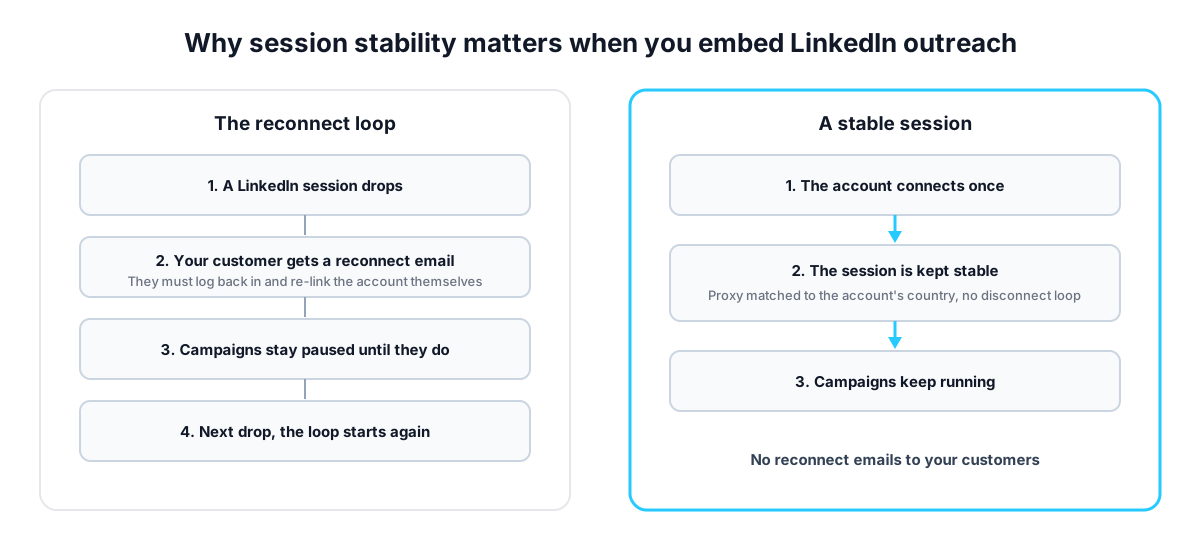
The before and after for a SaaS embedding this: before, every wave of session drops means emailing 30 customers to re-link their accounts, with campaigns paused until they do. After, accounts connect once and stay connected.
On pricing, a concrete case. A founder in Berlin builds an AI SDR product and connects each customer's LinkedIn seat. At 1,200 customer accounts, the €3.50 tier comes to about €4,200 a month, and it grows with every signup. On LinkupAPI the same 1,200 accounts already sit at the $3,000 ceiling, and the bill does not change when customer 1,201 connects.
The honest trade-off. You give up channel breadth. No Instagram, no Telegram, no calendar sync. The scope is B2B outreach: LinkedIn, email, WhatsApp. If your roadmap needs a unified inbox across consumer channels, this is the wrong trade.
The account connection flow is covered in the docs. Get your API key at linkupapi.com to test it against your current setup.
The Honest Case for Staying on Unipile
Stay on Unipile if your product needs channels beyond B2B outreach. Instagram DMs, Telegram, calendar sync, and a unified inbox across all of them are exactly what it was built for. No B2B-focused API replaces that breadth.
The same applies at small scale. If you run 10 accounts and the €49 floor fits your budget, switching gains you little on price.
Unipile also keeps a strong security record: it is SOC 2 Type II certified and hosts data in France, per its security and compliance page. For teams selling to European enterprises, that paperwork matters.
Switch when the account count makes the bill a problem, or when session drops keep sending your customers back through the login flow. Until then, staying is a reasonable choice.
How Do You Switch Without Breaking Your Outreach?
If you run a SaaS or an AI agent product with thousands of connected users, the migration is mostly endpoint mapping. The API follows the same model as Unipile: connect an account, then call actions against it. The concepts transfer one to one, so most of your integration logic can be reused.
One founder building an internal replies dashboard put it this way: "I just need a table of who replied to each campaign, without getting my account restricted."
If part of your product is agent-driven, the same platform speaks MCP as well. The setup is covered in our guide to connecting Claude to LinkedIn, and builders comparing agent stacks can start with the AI agent for LinkedIn guide.
Frequently Asked Questions
Is Unipile safe for LinkedIn accounts?
Unipile runs real member sessions, so the honest answer is: safer than browser bots, never zero risk. Restrictions come from pace and volume more than from the tool itself. Whatever platform you pick, warm accounts up slowly, match the proxy to the account's country, and stay under daily limits.
How much does Unipile cost per month?
Unipile starts at €49, about $55, per month, covering up to 10 connected accounts. Above that, a degressive rate applies to all accounts: €5.00 each from 11 to 50, €4.50 to 200, €4.00 to 1,000, €3.50 to 5,000, and €3.00 above 5,000. Usage is not billed.
What is the best Unipile alternative for LinkedIn outreach?
For B2B outreach driven by an AI agent, LinkupAPI is the closest match: the same LinkedIn and email actions, sessions designed to need fewer reconnects, and per-account pricing capped at $3,000 a month. If your need is email and calendar sync only, Nylas or EmailEngine are stronger fits.
What is a cheaper alternative to Unipile?
At small scale, Unipile is already cheap: €49 a month covers 10 accounts. The savings appear at volume. LinkupAPI costs about the same up to a few hundred accounts, then caps the bill at $3,000 a month for unlimited accounts, where Unipile reaches €4,000 at 1,000 accounts and €17,500 at 5,000.
What is the best Unipile alternative for AI agents?
LinkupAPI ships an MCP server, so Claude, ChatGPT, Gemini or your own agent can send LinkedIn connection requests and messages, then follow up by email or WhatsApp, without a custom integration. Unipile exposes REST endpoints that you wire into the agent yourself.
Unipile vs Linked API: which is better for LinkedIn automation?
Linked API is built for LinkedIn only, runs each account in a cloud browser and charges $49 per seat on annual billing. Unipile covers more channels and charges per connected account on a sliding scale. If you connect many accounts for your own customers, a per-account model with a ceiling, like LinkupAPI, stays cheaper than either.
What is the difference between Unipile and LinkupAPI?
Unipile is messaging plumbing across many channels, billed per connected account. LinkupAPI focuses on B2B outreach actions for AI agents: LinkedIn, email, and WhatsApp, driven through MCP, billed per connected account, with a $3,000 Unlimited plan at the top that covers unlimited accounts.
Does Unipile find leads or verify emails?
Lead search is not its center of gravity. The catalog focuses on messaging, inbox sync, email, and calendars. In public stack breakdowns, builders pair it with a data tool such as Clay or Crustdata, and that pattern holds across outreach APIs: the data source stays a separate product.
If your account count is growing, get your API key at linkupapi.com and run the two side by side on a subset of accounts.
