Best LinkedIn MCP Servers 2026: 8 Options Compared by Job
Eight LinkedIn MCP servers compared in September 2026, sorted into content, data and outreach families, with the session model, published pricing and the fit for each.
By The LinkupAPI Team · Reviewed by Eliott · Updated
Written by the LinkupAPI Team, reviewed by Eliott. Facts checked September 11, 2026.
Picking the best LinkedIn MCP server is the wrong first question. Nine repositories, three directories and a dozen vendor pages all answer it differently, and every one of them is right about a different job.
The useful question is what your agent has to do on LinkedIn. Publish a post? Pull a profile? Send a connection request and follow up by email? Each job has its own family of servers, its own authentication model, and its own bill.
This is the map of the best LinkedIn MCP servers 2026 offers, sorted by job. Eight options, checked in September 2026: what each one does, whose session it runs on, what it costs, and where it loses.
Key Takeaways
- LinkedIn publishes no official MCP server. Every option is third-party, and the session model matters more than the tool list.
- Three families: content servers on the official API, data servers on a browser session or a crawler, and outreach servers that act through an authenticated session.
- Prices run from free open source to $2,999 a month for a campaign tool. Usage meters and seat meters behave very differently at 20 accounts.
- Only the outreach family lets an agent turn a post's reactions into connection requests and a follow-up email.
What Is a LinkedIn MCP Server?
A LinkedIn MCP server is a connector that gives an AI agent tools to read or act on LinkedIn, such as fetching a profile, publishing a post, or sending a connection request. The agent discovers the tools automatically through the Model Context Protocol, so you add a capability without writing integration code.
MCP is the standard Anthropic created to connect agents to outside tools. Claude, Cursor, Codex and most custom agents speak it. ChatGPT is the exception and uses Custom GPT Actions instead.
What matters is what sits behind the connector. Three things decide whether a server fits your job:
- The tools it exposes. Read a profile, write a post, send a message, find an email. Most servers do one or two of these well.
- The session it uses. LinkedIn's official API with OAuth, your own browser session with a cookie, or a hosted authenticated session the vendor manages.
- The meter. Free, per seat, per sender, or per action.
Three neighbours help place the category:
- Not a browser automation tool. Phantombuster or Dripify replay clicks in a headless browser on a schedule a person set. An MCP server hands the action to the agent, which decides who, what and when.
- Not a workflow builder. Make, n8n and Zapier chain triggers between apps. Zapier does ship an MCP bridge, covered below, but the logic still lives in a flow chart, not in the agent.
- Not LinkedIn's own product. There is no official LinkedIn MCP server and no official Claude connector. That is the answer to the most searched question on this topic.
Which Job Do You Need Done: Content, Data, or Outreach?
Every LinkedIn MCP server belongs to one of three families, and the family is set by the job and the session. Content servers publish and analyse your own posts on the official API. Data servers read profiles, companies and jobs through a browser session or a crawler. Outreach servers send invitations and messages through an authenticated session and often add email.
The families rarely overlap. A content server cannot send a connection request, because the official API does not allow it. A data server can read a profile but cannot message it. An outreach server can do both, and it is the only family where the session risk and the pricing meter really need reading.
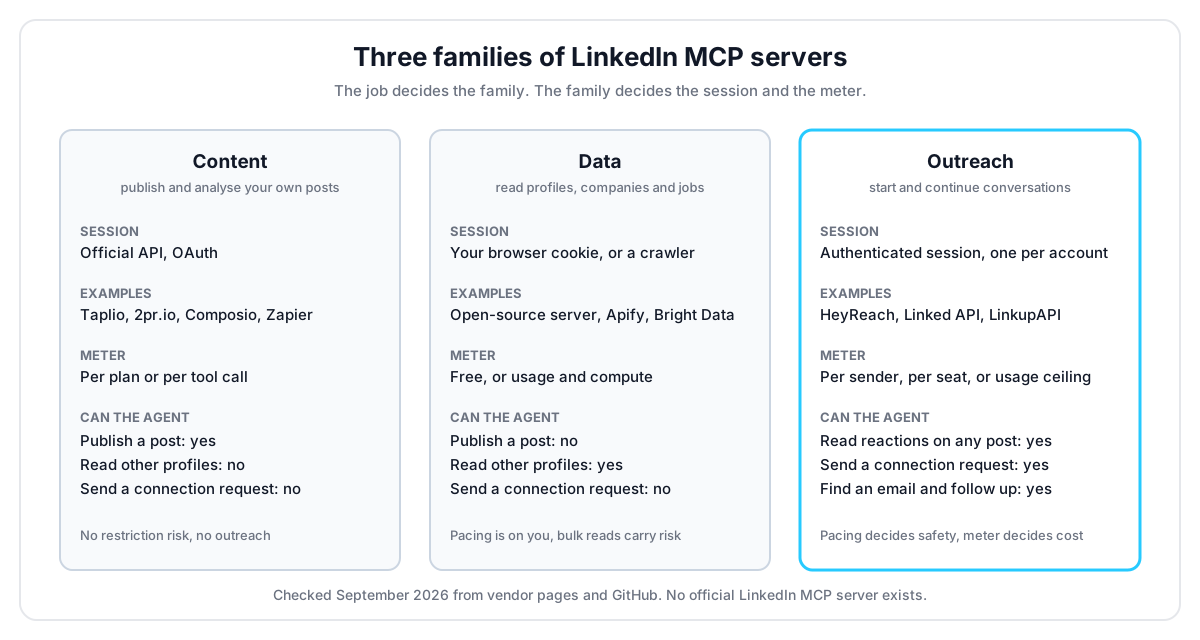
Here is what that means for a builder. If the agent writes and schedules posts, stay in the content family and pick by price. If it researches people, the data family is enough. If it has to start conversations, only the outreach family applies, and the rest of this page spends most of its time there.
How Do the 8 LinkedIn MCP Servers Compare?
Eight servers cover the search in 2026, and they split cleanly by family. One open-source data server, three content servers, two data platforms, and two outreach options with different meters. Prices come from each vendor's pricing page in September 2026, and the open-source numbers from GitHub on the same day.
1. stickerdaniel/linkedin-mcp-server: the open-source default
The most starred LinkedIn MCP server on GitHub, at 3,442 stars under an Apache 2.0 licence, with a commit the day we checked. It runs locally, logs into LinkedIn through a Chrome session on your machine, and exposes profiles, companies, jobs and messages as tools for Claude or any MCP client.
Best for a developer who wants free reads on their own account and accepts the setup. It loses on two counts: the session is your personal cookie, so pacing is entirely on you, and there is no send. Reading is the whole job.
2. Taplio MCP: content from your AI assistant
Taplio connects its LinkedIn growth suite to Claude, ChatGPT or any MCP-enabled model: find ideas, draft in your voice, schedule, and read analytics. Plans run $39, $69 and $199 a month, or $32, $49 and $149 on annual billing, with a free trial on every tier.
Best for a founder or a personal brand that already lives in Taplio. It loses the moment the job becomes outbound. The suite has a warm-lead DM feature, but the MCP is built around publishing, not prospecting.
3. 2pr.io MCP: the widest content tool surface
2pr.io runs on LinkedIn's official API with no cookies, and its own blog counts 38 tools as of August 2026: drafts, carousels and images, scheduling, publishing, an engage inbox and analytics. Pricing is $49 a month, or $24 on annual billing, with per-profile plans from three profiles at $24 or $17.
Best for a team that wants media and scheduling from Claude or Cursor on a ban-free footing. Official API means official limits, though. No people search, no connection requests, nothing outside your own posts.
4. Composio LinkedIn toolkit: managed actions for agent builders
Composio wraps LinkedIn's official API as one toolkit among hundreds, with auth handled for you and one MCP gateway for every tool. The Hobby plan is free with 100,000 tool calls a month, Pro is $29 a month, and usage past the included amount bills at $0.0003 per tool call.
Best for a builder assembling a multi-tool agent who wants LinkedIn posting next to Slack, Gmail and a CRM. It inherits the official API's boundary: posting and profile basics, no outreach. Zapier's MCP plays the same bridge role for no-code teams, with the logic in a Zap.
5. Apify and Bright Data: data extraction at scale
Apify exposes its Actor marketplace through an MCP server, so an agent can run a LinkedIn profile or jobs Actor and read the output. Plans start free with $5 of monthly credit, then $19, $199 and $999 plus usage. Bright Data's Web MCP takes the same role with crawling infrastructure behind it, and gives 5,000 MCP requests a month free.
Best for a technical team that needs bulk profiles, companies or jobs, and has an engineer to run it. It loses for anything conversational. These are pipes for data, and the account risk of bulk reads sits with you.
6. HeyReach MCP: a campaign tool with an agent handle
HeyReach is a LinkedIn outreach platform for agencies, and its MCP lets an agent split lead lists, create campaigns and read activity. The meter is the sender: $79 a month per sender, $999 for 25 senders, $2,999 for unlimited under a fair-use policy, with quarterly and annual discounts.
Best for an agency that already runs campaigns in HeyReach and wants Claude to operate the dashboard. It loses when the agent needs to act outside a campaign: no ad hoc message to one person, no email discovery inside the same tool, and the bill grows with every sender.
7. Linked API: per-seat actions with an MCP
Linked API sells LinkedIn actions on your own account over REST, SDKs, a CLI and an MCP, with 50+ standard actions and unlimited workflow execution. Plans are 49 euros per seat a month, or 74 euros with Sales Navigator actions. A seat is one LinkedIn account.
Best for a developer automating one or a few accounts who wants every action open. It loses at scale for the same reason as HeyReach: the seat meter. Twenty accounts is twenty seats, and email is not part of the product.
8. LinkupAPI: outreach actions priced per account, with a ceiling
LinkupAPI is an MCP server with LinkedIn, email and WhatsApp capabilities, built for agents rather than dashboards: search people, read post reactions and comments, send connection requests and messages, find and verify work emails, all through your authenticated session. Pricing is per connected account: $55 a month for the first 10, then $5.50 each up to 50, $5.00 up to 200 and $4.50 beyond, with unlimited outreach and MCP tool calls. Email finding and verification use credits. The bill is capped at $3,000 on the Unlimited plan, with unlimited connected accounts.
Best for products that embed outreach and teams running an agent across many accounts. It loses for a solo user who wants a scheduling calendar and a content coach. There is none. The next three sections show the workflows this family exists for.
How Does an Outreach MCP Turn Post Reactions Into Conversations?
An outreach MCP turns post reactions into conversations by giving the agent three tools in a row: read who reacted to a post, qualify them against a filter, and send a connection request that references the post. No content server can do the second and third steps, because the official API stops at your own posts.
The reason it works is timing. Someone who liked a competitor's launch post this morning is a warmer prospect than a name in a purchased list. The reply lands while they still remember what they engaged with.
Here is what it looks like for a 2-rep team at a Series A dev-tools startup. Their agent watches 30 competitor accounts. Monday at 8:12am it pulls the reactions on the 12 hottest launch posts of the week, about 500 people. It keeps the 40 engineering managers at companies with 50 to 500 employees, drafts a two-line note for each that names the post, and queues the requests for approval. The reps clear the batch over coffee.
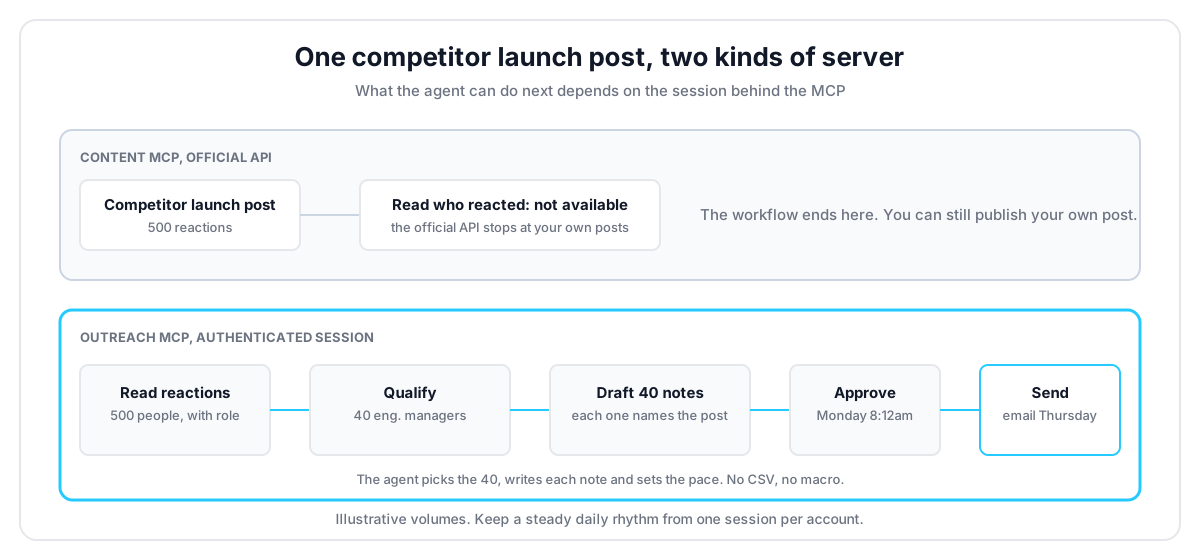
Nothing in that loop is a macro. The agent chooses which 40, writes each note, and decides when. That is the difference between an MCP server and a browser tool replaying a recipe. Setup takes about 10 minutes. Get your API key at linkupapi.com to run this play on your own account. The full version is in our guide to high-intent LinkedIn leads with Claude.
What Changes When the Agent Also Needs Email?
Email changes the family you can use. A data server finds 25 heads of sales in Berlin. An outreach server finds them, verifies a work email for each, sends the LinkedIn touch, and follows up by email three days later from the same tool. The difference is one sequence instead of two products and a CSV between them.
Take a recruiting agency placing sales leaders in DACH. The agent searches heads of sales at 100 to 1,000-person SaaS companies in Berlin, gets 25 matches, and runs email discovery on all 25. Eighteen come back verified. It sends a connection note to the 25 on LinkedIn, and on Thursday it emails the 18 who have not accepted yet. The recruiter sees one thread per person, not two tools.
The mistake most teams make here is buying a data MCP and a content MCP and expecting them to add up to outreach. They do not. Reading and publishing are two ends of a bridge with no middle. The LinkedIn message endpoint and the email tools are what make the middle exist.
Which Server Fits an Agency or a Product?
An agency or a product should pick by meter before features. Seat and sender meters, like Linked API, HeyReach and Taplio per profile, grow with every account you connect and never stop. A per-account meter with a ceiling does stop, and the ceiling is the point: past about 640 accounts, the bill stays at $3,000 however many more you add.
Run the numbers for a 3-person GTM agency with 12 client accounts. On a per-seat model at 49 euros, that is about 590 euros a month before Sales Navigator actions. On a per-sender model at $79, it is $948, and the Agency tier at $999 makes sense from 13 accounts. On LinkupAPI's per-account pricing, twelve accounts cost $66 a month, and the next client adds $5.50.
A product is a different case again. A recruiting SaaS that wants a "message this candidate" button cannot ship a dashboard tool to its users. It needs endpoints, webhooks and an MCP its own agent calls, which is the whole idea behind LinkedIn automation through MCP.
Best for, not for. Per-account pricing with unlimited outreach fits teams running outbound at volume with an agent already in the stack, agencies with one agent per client, and products that embed outreach. If you send ten hand-written notes a week from one account, the free open-source server or a $39 content plan is the right size.
You are probably thinking an outreach API means an engineering project. It means one key and one connector in Claude's settings. What you give up is a ready-made dashboard. What you get is an agent that decides.
The Mistake Most Teams Make With LinkedIn MCP Servers
The mistake is treating the server as the safety layer. It is not. Account restrictions come from volume and pacing, whatever tool sends the action, and the servers that promise a ban-free life are the ones that cannot send anything at all.
Two patterns from builders on Reddit this summer make the point. One engineer wired Claude's Chrome extension to LinkedIn and watched it burn tokens, because a browser agent works from screenshots: it photographs a profile, parses the picture, scrolls, and repeats. A structured tool call returns the same profile as one JSON object. Another built a local server on his own session and asked whether anyone else would want it. The answer was yes, until the pacing question came up.
What surprised us when we tested weekly loops was how little the daily number mattered compared to the shape. A steady 25 requests a day from one authenticated session behaves like a person. A burst of 200 on Monday does not, from any server. Keep new accounts slow, keep one session per account, and let the agent spread the work.
How Do You Run This Workflow with Claude?
You run it by connecting one MCP server to Claude, pasting a prompt that describes the play, and turning the conversation into a scheduled routine. No code, about ten minutes, and the same connector works in Cursor, Codex and custom agents. ChatGPT uses Custom GPT Actions instead.
- Get your API key at linkupapi.com. Every plan opens all endpoints, and $55 a month covers up to 10 connected accounts for the test.
- In Claude, open Settings, then Connectors, and add the MCP server. Cursor and any MCP-compatible agent take the same server. For ChatGPT, use the Custom GPT Actions path.
- Paste the prompt: "Pull everyone who reacted to this competitor launch post in the last 7 days, keep the 40 engineering managers at US companies with 50 to 500 employees, find a verified work email for each, draft a two-line LinkedIn note that mentions the post, and queue the requests for my approval."
- Turn it into a routine. Claude Cowork runs the workflow on a schedule from claude.ai for non-technical teams, and Claude Code routines do the same for developers. No external workflow tool needed.
The hub for the Claude side is how to connect Claude to LinkedIn. For the wider picture of what an agent can do once connected, read the AI agent for LinkedIn guide.
Frequently Asked Questions
Is there an official LinkedIn MCP server?
No. LinkedIn publishes no MCP server and no official Claude connector in 2026. Every LinkedIn MCP server you can install is third-party. Some run on LinkedIn's official API with OAuth, which limits them to your own posts and profile. Others run through a browser session or an authenticated session, which is what allows reads on other people and outreach actions.
Will a LinkedIn MCP server get my account restricted?
The server is not the risk. Volume and pacing are. LinkedIn restricts scripted bursts from any source, so a steady daily rhythm from one authenticated session at human pace is what keeps an account healthy. Servers on the official API carry no restriction risk because they cannot send invitations or messages at all. Warm new accounts slowly and keep one session per account.
What is the difference between a content MCP, a data MCP and an outreach MCP for LinkedIn?
A content MCP publishes and analyses your own posts on the official API, like Taplio or 2pr.io. A data MCP reads profiles, companies and jobs through a browser session or a crawler, like the open-source server or Apify. An outreach MCP sends connection requests and messages through an authenticated session and usually adds email, like HeyReach or LinkupAPI. Only the third family starts conversations.
Can Claude send LinkedIn connection requests and messages through an MCP server?
Yes, with an outreach MCP server connected in Settings, then Connectors. Claude can search people, read the reactions on a post, send connection requests with a personalised note, message accepted connections and follow up by email, all from one conversation. Claude Cowork can then run the same play on a schedule without a workflow tool.
Which LinkedIn MCP servers work with Cursor, ChatGPT and custom agents?
Any server that speaks MCP works with Cursor, Codex, Claude Code and custom agents built on an MCP client, so every option above except the Zapier bridge fits a developer stack. ChatGPT is the exception: it does not consume MCP directly and needs Custom GPT Actions, which the API-first servers support through their REST endpoints.
The best LinkedIn MCP server is the one that does your agent's job on the right session at a price that survives your account count. If that job is starting conversations, get your API key at linkupapi.com and run the reaction play this week.
