LinkedIn API in 2026: Access, Pricing & What It Can't Do
What the LinkedIn API allows in 2026: open permissions, partner programs, cost, rate limits, messaging rules, and the outreach alternatives teams use.
Written by the LinkupAPI Team, reviewed by Eliott. Facts checked October 2026.
Most developers type "LinkedIn API" expecting a key and a list of endpoints. What they find is a sign-in button, a share button, and a set of partner programs with application forms.
That gap surprises almost everyone. It also decides what you can build.
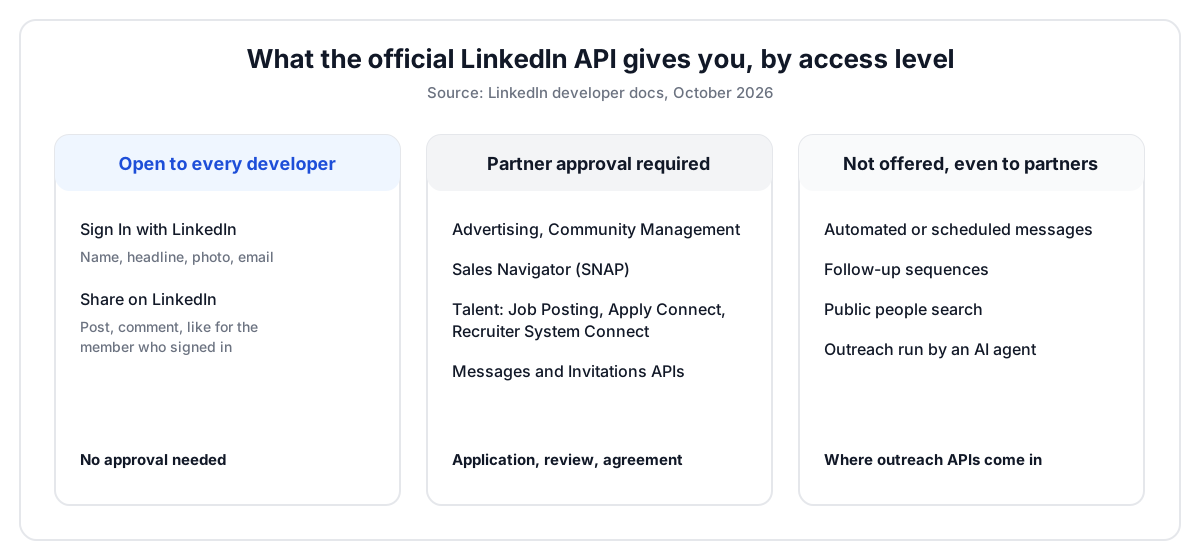
Short answer: the LinkedIn API is real, documented, and free to call, but it stays narrow even after approval. Without approval, it covers sign-in, basic profile data and posting. Partner approval adds ads, Pages, Sales Navigator, recruiting, messaging and invitations, each under strict rules. Messages only go to first-degree connections, and the member must send each one. Nothing can be automated or scheduled.
This guide covers what each part of the LinkedIn API does, how access works, what it costs, and what teams use when they need outreach the official API does not allow.
Key Takeaways
- The LinkedIn API gives every developer only three open permissions: sign in, email, and posting.
- Even approved partners can only message first-degree connections, one member action at a time, with no automated or scheduled sends.
- LinkedIn publishes no price list. Rate limits are set per app and per member, and reset at midnight UTC.
- Outreach APIs fill the gap by acting from a connected LinkedIn profile, billed per account.
- Pick by use case: sign-in and sharing fit the official API, outreach at scale does not.
What Is the LinkedIn API?
The LinkedIn API is a set of REST endpoints, run by LinkedIn, that lets approved apps sign members in, publish content, manage ads and Pages, and sync sales or recruiting data. It uses OAuth 2.0. Most of it requires explicit approval, and only a handful of permissions are open to any developer.
LinkedIn groups the API into product families in its developer product catalog:
- Consumer: Sign In with LinkedIn, Share on LinkedIn, Verified on LinkedIn, Live Events.
- Marketing: Advertising, Community Management, Events, Data Integrations.
- Sales: Sales Navigator display services for CRM partners.
- Talent: Job Posting, Apply Connect, Recruiter System Connect.
- Learning and Regulatory: LinkedIn Learning content, data portability for members and Pages.
Notice what is missing. There is no "search people" product for the public. There is no "send a message to a prospect" product either. The LinkedIn API is built for apps that extend LinkedIn, not for apps that run outreach on it.
What Can You Do With the LinkedIn API Without Approval?
Without approval, the LinkedIn API lets you sign members in, read their name, headline, photo and primary email, and post on their behalf. That is the full list of open permissions, per LinkedIn's Getting Access page. Everything else needs a partner application.
| Open permission | Product | What it returns or does |
|---|---|---|
| profile | Sign In with LinkedIn (OpenID Connect) | Name, headline and photo of the member who signed in |
| Sign In with LinkedIn (OpenID Connect) | Primary email address of that member | |
| w_member_social | Share on LinkedIn | Post, comment and like on behalf of that member |
The key word is "authenticated member". Open permissions only touch the person who clicked "Sign in". You cannot look up someone else, list their connections, or read their inbox.
That makes the open tier a good fit for a job board login, a "share your certificate" button, or a social scheduling tool. It is a poor fit for anything that needs data about people who never visited your app.
Here is what changes, and what does not, once LinkedIn approves you:
| Task | Without approval | With partner approval |
|---|---|---|
| Sign members in, read their name, headline, photo and email | Yes | Yes |
| Post, comment and like for the signed-in member | Yes | Yes |
| Run ad campaigns and read ad reporting | No | Yes, Advertising API |
| Manage a company Page and its comments | No | Yes, Community Management API |
| Sync jobs and applicants with an ATS | No | Yes, Talent programs |
| Message a first-degree connection, sent by the member | No | Yes, Messages API |
| Send messages automatically or on a schedule | No | No |
| Run a follow-up sequence after an invitation | No | No |
Which LinkedIn API Programs Need Partner Approval?
Every LinkedIn API program beyond sign-in and sharing needs partner approval: Advertising, Community Management, Sales Navigator, Talent and Learning. Each one has its own application, its own review, and its own agreement. LinkedIn closed the Compliance program to new applicants entirely.
| Program | What it unlocks | Who usually gets in |
|---|---|---|
| Advertising API | Campaign management, ad reporting, audiences | Ad tech platforms and agencies with real ad spend |
| Community Management API | Page posts, comments, Page analytics | Social media management tools |
| Sales Navigator Application Platform (SNAP) | Sales Navigator profiles in a CRM, analytics, CRM validation | CRM and sales engagement vendors |
| Talent programs | Job posting, Apply Connect, Recruiter System Connect | Applicant tracking systems and job boards |
| Compliance | Message and activity archiving | Closed to new applicants |
The programs are built for established platform types: ad tech, social media tools, CRMs and applicant tracking systems. A two-person startup building an AI SDR rarely fits any of these boxes.
How Do You Get Access to the LinkedIn API?
To get access to the LinkedIn API, you create an app in the LinkedIn Developer Portal, link it to a company Page, then add products from the Products tab. Open products activate instantly. Partner products open an application that LinkedIn reviews case by case. LinkedIn publishes no review timeline, and approval is never guaranteed.
- Create an app at developer.linkedin.com and verify it with a LinkedIn Page you admin.
- Add Sign In with LinkedIn or Share on LinkedIn. These work right away.
- For anything else, apply from the Products tab or the program's own form.
- Implement OAuth 2.0. Member data uses the 3-legged flow, app-level data uses the 2-legged flow.
Then plan for token expiry. Member access tokens last 60 days. App-level tokens from the 2-legged flow last 30 minutes. Per LinkedIn's refresh token docs, programmatic refresh tokens last 365 days, but only a limited set of partners get them.
Everyone else re-runs the authorization flow. It stays silent only if the member is still logged in to LinkedIn and the old token has not expired. Otherwise the member sees the login screen again.
The mistake most teams make is building the product first and applying second. Apply first. The answer shapes the whole architecture.
Is the LinkedIn API Free?
The LinkedIn API has no public price list, and calling the open permissions costs nothing. Partner programs run on agreements negotiated with LinkedIn, so the real cost is approval, not a per-call fee. The practical limits are rate limits, which LinkedIn sets per app and per member and does not publish.
According to LinkedIn's rate limiting docs, limits count calls over 24 hours and reset at midnight UTC. There are two of them:
- Application limit: total calls your app can make in a day.
- Member limit: calls your app can make for one member in a day.
Go over and you get a 429 response. You only discover your exact quota in the Analytics tab of your app, after making at least one call to the endpoint.
So "free" is accurate and a little misleading. The money you save on fees goes into the application process and the features you cannot ship.
Can the LinkedIn API Send Messages or Connection Requests?
The LinkedIn API has a Messages API and an Invitations API, but both are restricted to approved partners. The Messages API also forbids automated or scheduled sends: each message must follow a specific action by the member, who must see and edit the draft before sending. Outreach sequences are ruled out by design.
The Messages API requirements spell it out. A member navigating your app does not count as an action. Members must opt in, not opt out. A pre-written message must stay editable.
What approval still does not give you:
- Messages only to first-degree connections, or replies in an existing conversation.
- Each message tied to a specific action by the member. Browsing your app does not count.
- An editable draft the member reviews and sends, never a message sent for them.
- No automated or scheduled sends, so no follow-up sequence.
- Invitations only on behalf of the member who signed in.
- Daily call limits per app and per member that LinkedIn sets and does not publish.
That rule set is fine for a CRM "send via LinkedIn" button. It kills a follow-up sequence.
Proof, a real-shaped case. A 4-person team builds a recruiting tool for agencies in Paris and London. They want three things: send a connection note to 30 shortlisted engineers, follow up after five days, and log replies in their ATS. The Invitations API needs partner approval. The Messages API needs approval and forbids the day-five follow-up, because nobody clicked "send" on day five. The official route gives them none of the three.
This is the point where most teams start looking at other options.
What Are the Alternatives to the Official LinkedIn API?
The alternatives to the official LinkedIn API fall into three groups: outreach APIs that act from a connected LinkedIn profile, browser automation tools that click through LinkedIn for you, and workflow builders that chain those tools together. They differ on who holds control, how they bill, and how much code you write.
| Approach | Examples | Good for | Billing model |
|---|---|---|---|
| Official LinkedIn API, open tier | Sign In, Share on LinkedIn | Login, posting on a member's behalf | Free, no approval |
| Official LinkedIn API, partner programs | SNAP, Talent, Advertising | CRM, ATS and ad platforms at scale | Partner agreement |
| Outreach APIs | Unipile, agent-first outreach APIs | Software and AI agents that send invitations and messages | Per connected account |
| Browser automation tools | Phantombuster, Dripify, Expandi | One person running campaigns from a dashboard | Per seat |
A few boundaries help here.
An outreach API is not a browser tool. Phantombuster or Dripify replay clicks in a browser. An outreach API exposes the action itself, so your code or agent decides who to contact and when.
It is not a workflow builder either. n8n, Make and Zapier move data between apps. They can call an outreach API, but they do not replace one.
And it is not bulk data collection. In September 2026, LinkedIn obtained a consent judgment against ProAPIs and Netswift for mass scraping of profiles. Outreach APIs work from a profile the user connects, at the pace one person would keep.
How Does an Outreach API Work With a Connected LinkedIn Profile?
An outreach API works in a loop. The user connects a LinkedIn profile once through a hosted login. Your product or agent then sends invitations, messages and InMails with simple API calls. Replies and accepted invitations come back as real-time webhooks, so the next step can start without anyone checking an inbox.
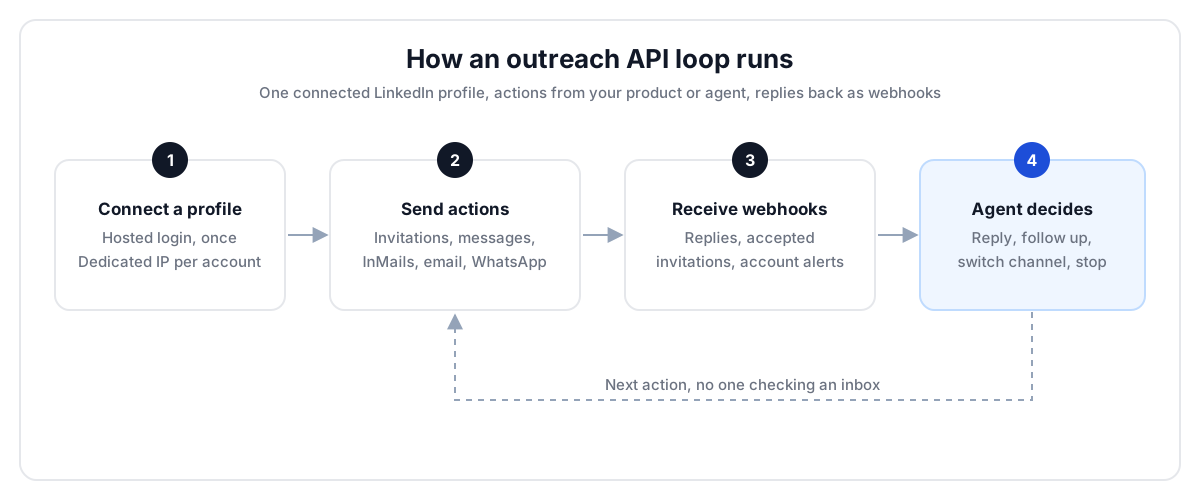
Here is the same loop by persona:
- Sales: an SDR agent invites the 40 people who commented on a competitor's launch post, then messages the ones who accept.
- Recruiting: an ATS sends a connection note to 30 shortlisted engineers and logs every reply on the candidate card.
- VC: an associate's agent messages founders who just announced a seed round, two days after the post.
- GTM agency: one dashboard runs 300 client profiles, each with its own dedicated IP and health alerts.
Before: a CSV of 500 names and a rep copying messages by hand. After: invitations go out at a steady pace, replies land as webhooks, and the rep only reads the conversations that matter.
Setup takes about ten minutes. Get your API key and connect your first profile to see the loop run.
Can You Connect LinkedIn to ChatGPT or Claude Through an API?
Yes. You connect LinkedIn to Claude, Cursor or any MCP-compatible agent through an MCP server, and to ChatGPT through Custom GPT Actions. The agent then gets tools like "search prospects", "send invitation" and "send message", and decides on its own who to contact and what to write.
MCP is the open standard Anthropic created to plug tools into agents. Think of it as installing an app on a phone: the agent gains new actions without custom code.
Proof, step by step. A 2-rep team at a Series A dev-tools startup opens Claude and types: "Find 25 engineering managers in Berlin at companies of 50 to 200 people, invite them with a note about their latest post, and follow up by email if they don't accept in five days." Claude runs the search, drafts 25 notes, sends the invitations, and checks back on day five. The reps review drafts instead of writing them.
For the full setup, see our guide on how to connect Claude to LinkedIn. To make it recurring, Claude Cowork can run the same prompt on a schedule from claude.ai. Claude Code routines do the same for technical teams.
How Much Does a LinkedIn Outreach API Cost?
LinkedIn outreach APIs bill per connected account, not per call. Published plans start around $55 a month for 10 accounts, then charge per extra account. The difference shows at scale: some plans never stop counting, others cap the bill once you pass a few hundred accounts.
| Connected accounts | Per-account plan, no ceiling | Per-account plan with a $3,000 cap |
|---|---|---|
| 10 | €49 or $55 a month | $55 a month |
| 100 | About €450 a month | $500 a month |
| 1,000 | About €4,000 a month | $3,000 a month |
| 5,000 | About €17,500 a month | $3,000 a month |
The left column uses Unipile's published rates: €49 or $55 for up to 10 accounts, then €5.00 down to €3.00 per account at every volume, per its pricing page (October 2026). Our Unipile review breaks down every tier.
LinkupAPI uses the same entry point, then caps unlimited accounts at $3,000 a month. Below a few hundred accounts the two models cost about the same. Above it, the cap matters.
The mechanism is simple. If your customers each connect their own profile, your account count grows with your revenue. A ceiling keeps your margin from shrinking as you grow.
Which Option Should You Choose?
Choose the official LinkedIn API when you need sign-in, posting, or you qualify for a partner program like SNAP or Talent. Choose an outreach API when your product or agent must send invitations and messages, follow up, and read replies. Choose a browser tool when one person runs campaigns by hand.
What actually matters when you compare options:
- Actions, not data: can it send, follow up and receive replies, or only read?
- Approval risk: does your roadmap depend on a partner application you may not win?
- Billing at your scale: price 10, 100 and 1,000 accounts before you commit.
- Agent support: is there an MCP server, or will you write every tool by hand?
- Channels: do you also need email and WhatsApp in the same flow?
Best for: SaaS products and AI agents that send outreach for many users. Not for: a solo founder sending ten InMails a week. A Sales Navigator seat and a browser tool are simpler and cheaper there.
You trade the official stamp for actions the official API will not give you. That is the honest trade-off.
How Do You Start Sending LinkedIn Outreach From Your Product?
You start in four steps: get an API key, connect a LinkedIn profile through the hosted login, plug the MCP server into your agent, and run a first prompt. You can send a first invitation the same day, then move the prompt into a scheduled task.
- Get your API key at linkupapi.com.
- Connect a LinkedIn profile with the hosted login. Add email and WhatsApp if your flow needs them.
- Add the MCP server in Claude (Settings, then Connectors), Cursor or your own agent. ChatGPT uses Custom GPT Actions.
- Paste a first prompt: "Invite the 20 people who reacted to our last post this week, with a short note that mentions what they reacted to."
For the full list of actions, see the LinkedIn automation API page and the message endpoint.
Frequently Asked Questions
Is the LinkedIn API free?
Yes, calling the LinkedIn API costs nothing, and there is no public price list. But only sign-in, email and posting are open to every developer. Messaging, invitations, Sales Navigator and recruiting data require partner approval and an agreement with LinkedIn, so the real cost is the approval process and the features you cannot build without it.
How do I get access to the LinkedIn API?
Create an app in the LinkedIn Developer Portal, link it to a LinkedIn Page you manage, and add products from the Products tab. Sign In with LinkedIn and Share on LinkedIn activate immediately. Every other product, including Advertising, Sales Navigator and Talent, requires an application that LinkedIn reviews case by case.
Can the official LinkedIn API send messages or connection requests?
Only for approved partners, and only one message at a time. LinkedIn restricts the Messages and Invitations APIs to partners under agreement. The Messages API also forbids automated or scheduled sends: the member must take an action, review an editable draft, and send it. Automated follow-up sequences are not possible through it.
What's the difference between the official LinkedIn API and third-party LinkedIn APIs?
The official LinkedIn API is run by LinkedIn, limited to approved use cases, and built around one member acting in your app. Third-party outreach APIs work from a LinkedIn profile the user connects, and expose actions like invitations, messages and InMails with webhooks for replies. They bill per connected account and need no partner approval.
Can I connect LinkedIn to ChatGPT or Claude through an API?
Yes. Claude, Cursor and other MCP-compatible agents connect through an MCP server that exposes LinkedIn actions as tools. ChatGPT connects through Custom GPT Actions. Once connected, you describe the task in plain language, such as inviting 25 engineering managers in Berlin, and the agent runs the search, writes the notes and sends them.
Ready to send your first invitation from code or from Claude? Get your API key and connect a profile in a few minutes.
