LinkedIn Sales Navigator API 2026: SNAP Is Closed, What Works Now
LinkedIn Sales Navigator API in 2026: SNAP is closed to new partners and never had lead search. How to run full-filter searches and InMails via a seat.
By The LinkupAPI Team · Reviewed by Eliott · Updated
A thread on r/sales from two years ago still ranks third on Google for this query. The question in it has not aged: Sales Navigator is a great platform, so is there a way to get the data through an API? Most answers in the thread say no. Some say sort of. None of them are current.
Here is the current answer, with LinkedIn's own documentation as the source.
Short answer: LinkedIn has an official Sales Navigator API, called the Sales Navigator Application Platform. It is closed to new partners as of October 2026. It never offered lead search anyway. The working route is an outreach API that runs through a connected Sales Navigator seat. You get full-filter lead search, InMail, profile unlocks and replies, from any agent or product.
Key Takeaways
- LinkedIn's Sales Navigator Application Platform (SNAP) is not accepting new partners in 2026.
- SNAP never exposed lead search or message sending; it covers CRM sync, analytics exports and embedded profile widgets.
- A connected Sales Navigator seat gives an API every filter the seat has, including buyer intent.
- Each Sales Navigator seat carries 50 InMail credits and 25 profile unlocks a month.
- LinkupAPI runs Sales Navigator searches and InMails through a seat the user already pays for.
Sales Navigator API Options at a Glance (October 2026)
| Route | What it gives you | Who can use it | Price |
|---|---|---|---|
| SNAP Display Services | Embedded profile and account widgets, InMail from inside a CRM | Approved SNAP partners only | Partner agreement, not published |
| SNAP Analytics Services | Bulk export of seat activity, SSI, saved leads | Approved SNAP partners only | Partner agreement, not published |
| SNAP Sync Services | CRM data validation, profile associations | Partners, customers on Advanced Plus with CRM Sync | Partner agreement, not published |
| New SNAP application | Nothing | Closed, LinkedIn is not accepting new partners | Not available |
| Sales Navigator seat (Core / Advanced) | The subscription a human uses: search, 50 InMails, lists | Anyone | $119.99 / $159.99 per seat per month |
| Outreach API on a connected seat | Lead search with every filter, InMail, unlock, messages, replies | Anyone with a seat and an API key | Per connected account, from $55 a month for 10 |
Does LinkedIn Sales Navigator Have an Official API?
Yes, the official Sales Navigator API exists under the name Sales Navigator Application Platform, or SNAP. It is built for CRM and sales-engagement vendors, not for lead search. It has three parts: Display Services, Analytics Services and Sync Services. None of them return a list of leads matching a search.
What each part does, per LinkedIn's SNAP documentation on Microsoft Learn:
- Display Services embeds Sales Navigator modules in another app through an iframe or JavaScript SDK. Think profile views, recent activity, and a button a human clicks to connect or send an InMail. Nothing is sent programmatically.
- Analytics Services is a bulk export of what a sales team did: activities, daily Social Selling Index, total connections, leads saved.
- Sync Services sits on top of CRM Sync. It validates CRM records against LinkedIn and returns profile photos and Sales Navigator links for matched contacts.
Read that list again with a prospecting hat on. Nothing searches. There is no endpoint that takes "VP of Engineering, fintech, Berlin, 51 to 200 employees" and returns people. The platform assumes a human runs the search inside Sales Navigator and the partner app decorates the CRM around it.
Sync Services also requires the customer to be on Sales Navigator Advanced Plus with CRM Sync enabled. LinkedIn quotes that plan on request (LinkedIn sales integrations page). The partner list is HubSpot, Salesforce, Microsoft Dynamics 365, Oracle Sales, Gong, Outreach and Salesloft. That is the intended audience.
Can You Still Apply to SNAP in 2026?
No. LinkedIn's documentation states that it is not currently accepting new partners for access to the Sales Navigator API. It will update the page if onboarding capacity changes. The same notice appears on LinkedIn's sales integrations page under "Becoming a partner".
The notice has been up through all of 2026. No reopening date is given.
In our experience, the teams that get hurt are the ones that planned a roadmap around SNAP access before reading that page. Three things follow from that. A startup cannot plan a roadmap around SNAP access. An agency cannot buy its way in with a bigger Sales Navigator contract. And every blog that walks you through "how to apply" is describing a form that leads nowhere.
The ZoomInfo review that ranks on this query says the same, then pitches its own database. That is a fair answer for teams that want contact data. It is not an answer for teams that want to act inside Sales Navigator: run a saved search, send an InMail, read the reply.
For that, the route is the seat itself. The one you already pay for.
How Do You Run Sales Navigator Searches Through an API?
You run Sales Navigator searches through an API by connecting a LinkedIn account that holds a Sales Navigator seat. Then you call a lead search action with friendly filters or a copied Sales Navigator URL. The search executes on the seat, with every filter the seat has, and returns detailed lead records.
The Search People Nav action accepts two kinds of input.
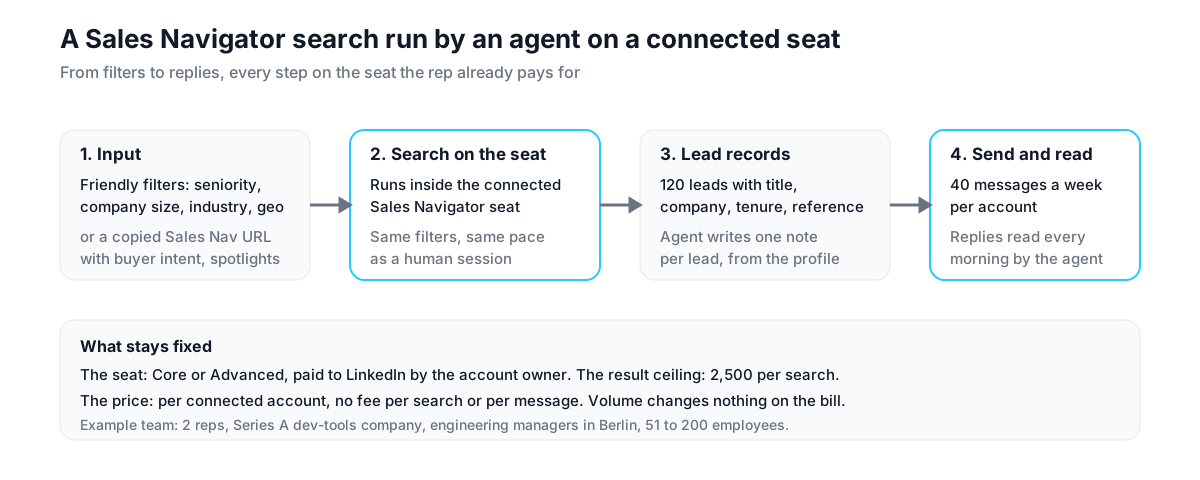
Friendly filters are plain values. Seniority such as Director, VP or CXO. Job function, current and past title, years in position. Company size as a headcount range, company type, headquarters region such as DACH or North America. Industry, geography, profile language, school. Values inside one filter combine with OR, filters combine with AND. So "VP or CXO" and "Software Development" and "Berlin" reads exactly as a human would set it.
The second input is a copied URL. Build the search visually in Sales Navigator, including filters with no API name such as buyer intent and spotlights. Copy the page address and pass it as is. Saved searches and lead lists work the same way.
Here is what that looks like for a 2-rep team at a Series A dev-tools company. The agent searches for engineering managers at companies between 51 and 200 people in Berlin. It keeps those 1 to 2 years into their role, at firms that posted a backend job last month. It gets 120 leads with current title, company and a recipient reference. It writes a two-line note for each that mentions the job post. It sends 40 a week from each rep's account, and reads replies every morning. The reps review a short list, not a spreadsheet.
The mistake most teams make is treating a seat like an unlimited pipe. Two details decide whether this holds up in production.
First, pace. The search runs on one authenticated seat at the rhythm LinkedIn allows from one session. The API does not multiply what a seat can do. It removes the human from the loop.
Second, the result cap. Sales Navigator shows at most 2,500 results per search in the product, and a search through the seat sees the same ceiling. Narrow searches, many of them, beat one giant one.
Setup takes about 10 minutes. Get your API key at linkupapi.com and connect a seat you already pay for.
How Do InMail Credits Work Through an API?
InMail credits through an API are the seat's own credits. Every Sales Navigator plan includes 50 a month, and each InMail the API sends spends one. A separate monthly limit set by LinkedIn can block InMails even when credits remain, which is why a seat check comes before any batch.
What surprised us when we tested the fuse was that a seat with 57 credits left still refused every InMail. Credits were never the problem. The seat was.
The 50-credit figure is on LinkedIn's compare plans page for Core, Advanced and Advanced Plus alike. What LinkedIn does not advertise is the monthly fuse. Once tripped, the seat refuses every InMail with the code INMAIL_MONTHLY_FUSE_LIMIT, credits or not, until LinkedIn's own cycle resets it.
The way around wasted sends is a sequence of checks, each a single action:
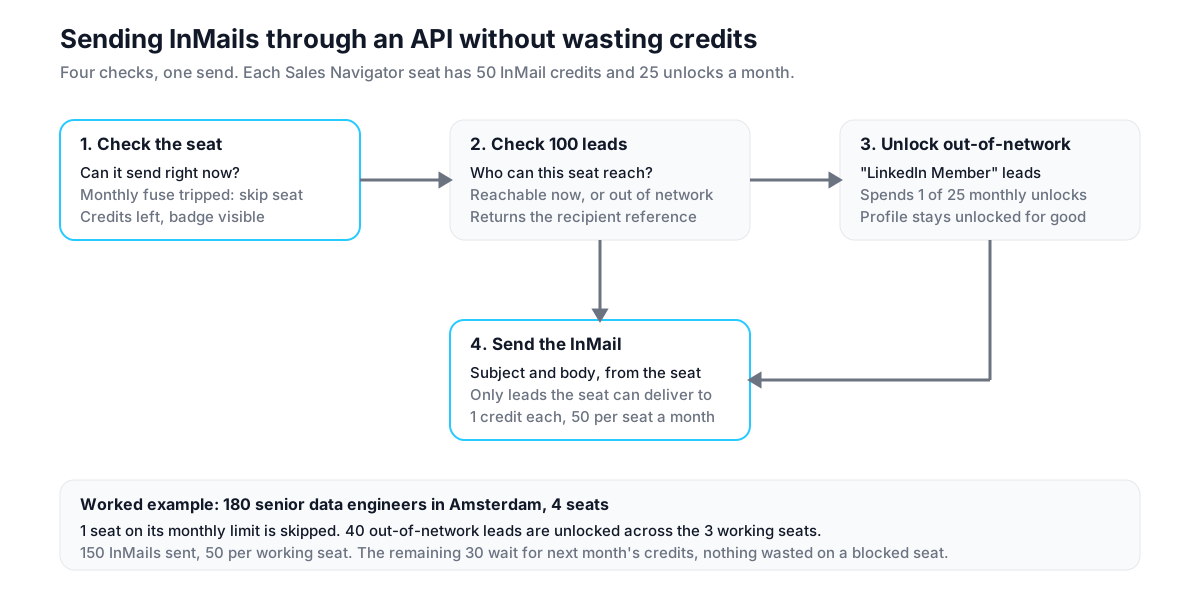
- Check the seat. The Check InMail Seat action reports whether the seat can send right now and how many credits remain. Nothing is sent.
- Check the leads. Up to 100 profiles at once go through Check InMail. It returns who can receive an InMail from this seat right now, who is out of network, and the recipient reference to use.
- Unlock the rest. A lead outside the seat's network shows as "LinkedIn Member" and cannot be InMailed. The Unlock action spends one of the seat's 25 monthly unlocks and reveals the profile for good.
- Send. The message goes out as an InMail with a subject line, from the seat, to the recipient reference returned above.
One seller on r/sales summed it up: "Sales Nav is a great platform, but I'm wondering if there's a way to get the data via API." The data was never the hard part. Spending 50 credits on 50 people who will never see the message is.
A worked example. A recruiting agency with 4 Sales Navigator seats wants to InMail 180 senior data engineers in Amsterdam. The agent checks all 4 seats: one is on its monthly limit and gets skipped. It checks the 180 profiles: 140 are reachable as they are, 40 show as out of network. It unlocks the 40 across the 3 working seats, 25 unlocks on one and 15 on another. It then sends 150 InMails, 50 per working seat, and queues the remaining 30 for next month. No credit is spent on a lead the seat cannot deliver to.
What a Sales Navigator API Is Not
A Sales Navigator API that runs on a connected seat is not a data export, not a CRM sync and not a replacement for the seat. Naming the real alternatives keeps the budget honest.
Not a bulk export tool. Evaboot and lobstr turn Sales Navigator results into CSV files with emails attached. Useful for list building. An outreach API leaves the data where it is and acts on it: search, message, read the reply.
Not SNAP Sync Services. CRM data validation and profile associations are LinkedIn partner features for Advanced Plus customers. If HubSpot or Salesforce is your system of record, that integration lives in their marketplace, not in an API key.
Not a browser automation tool. Dripify, Waalaxy and Expandi replay clicks in a browser on one seat each. Fine for a single rep. They cannot be called by an agent, and LinkedIn tends to flag them.
Not a replacement for the subscription. The seat is paid to LinkedIn by the person who owns the account, $119.99 or $159.99 a month. The API uses it. Without it, the Sales Navigator actions return an error that says exactly that.
Does This Work With a Sales Navigator Core Seat or Only Advanced?
A Core seat is enough. Core and Advanced share the same search filters and the same 50 monthly InMail credits, per LinkedIn's plan comparison. Advanced adds TeamLink, Smart Links and shared lists, and Advanced Plus adds CRM features. An outreach API needs any active Sales Navigator seat on the connected account, and the same applies to a Recruiter seat for recruiting searches.
That changes the math for small teams. A Core seat on annual billing works out to $89.99 a month. Add the connected-account price, $55 a month for up to 10 accounts. A solo founder runs agent-driven Sales Navigator outreach for under $150 a month.
The trade-off: on Core you do not get TeamLink paths or buyer intent at the team level, so a copied search URL carries fewer signals. Most prospecting workflows never use them.
Which Teams Should Use a Sales Navigator API, and Which Should Not?
A Sales Navigator API through a connected seat fits teams that already pay for seats and want an agent or a product to work them. Outbound teams, recruiting agencies, SaaS products with their users' seats. It does not fit teams that want contact data without a seat, or a CRM integration LinkedIn already provides through partners.
Best for: a 5-rep outbound team with Advanced seats and a Claude agent in the stack. A recruiting agency with 10 Recruiter and Sales Navigator seats. A sales-engagement product whose customers connect their own seats.
Not for: a team with no seats looking for emails and phone numbers. A data provider such as Apollo or ZoomInfo is the honest answer there. A Salesforce admin who wants CRM validation, which SNAP partners already deliver.
You are probably thinking this needs an engineering team. It needs one API key, one connected account and an MCP connection in the agent you already use.
Criteria that apply to any vendor on this route:
- Does the search accept a copied Sales Navigator URL, so no filter is lost?
- Can you check seat status before sending, to avoid burning InMail credits?
- Does it tell you which leads the seat can reach before spending a credit?
- Are Sales Navigator and Recruiter seats billed as extras, or included in the account price?
- What happens when LinkedIn puts the seat under review?
How Do You Run Sales Navigator From Claude?
You run Sales Navigator from Claude by connecting an MCP server with LinkedIn actions and describing the search in plain language. Claude calls the lead search on your seat, checks who can be InMailed, writes each message and sends it. Every step runs through the account you connected, at its pace.
- Get your API key at linkupapi.com and connect the LinkedIn account that holds the Sales Navigator seat.
- Add the MCP server in Claude under Settings and Connectors. The same connection works in Cursor, Claude Code and any MCP-compatible agent. ChatGPT uses the official plugin instead.
- Paste a prompt such as: "Run my saved Sales Navigator search for Heads of Data at fintech companies in Amsterdam. Check which of the first 100 can receive an InMail from my seat, and send those a short InMail about our data pipeline audit. Skip anyone my team already messaged."
- Schedule it. Claude Cowork runs the search every Monday from claude.ai. Claude Code routines do the same for technical teams. No external workflow tool needed.
The connection steps with screenshots are in how to connect Claude to LinkedIn. For what the official programs allow and cost, see the LinkedIn API guide and the LinkedIn API pricing breakdown.
Frequently Asked Questions About the Sales Navigator API
Does Sales Navigator have an official API?
Yes. The Sales Navigator Application Platform, or SNAP, is LinkedIn's official API for Sales Navigator. It offers Display Services, Analytics Services and Sync Services to approved partners such as CRMs and sales-engagement platforms. It does not include lead search, and LinkedIn is not accepting new partners as of October 2026.
Can I still apply to SNAP in 2026?
No. LinkedIn's SNAP documentation and its sales integrations page both state that new partner applications are not being accepted, with no reopening date. Existing partners keep their access. Teams that need to run searches or send InMails programmatically use an outreach API through a connected Sales Navigator seat instead.
Can an API run Sales Navigator searches with all filters?
Yes, when it runs on a connected seat. Friendly filters cover seniority, function, title, tenure, company size, industry and geography. For filters without a name, such as buyer intent or spotlights, build the search in Sales Navigator. Copy the URL and pass it to the API. Saved searches and lead lists work too.
How do InMail credits work through an API?
The API spends the seat's own credits: 50 a month on every Sales Navigator plan. A check across 100 profiles tells you who the seat can reach before anything is spent. LinkedIn also applies a monthly fuse that blocks InMails regardless of credits, so a seat check before each batch prevents wasted sends.
Does this work with a Sales Navigator Core seat or only Advanced?
Core works. Core and Advanced share the same search filters and 50 InMail credits per month. Advanced adds TeamLink, Smart Links and shared lists, and Advanced Plus adds CRM sync. The API only needs an active seat on the connected account. A Recruiter seat covers recruiting searches the same way.
Put the seat you already pay for to work. Get your API key at linkupapi.com and run your first Sales Navigator search from an agent today.
