Unipile Review 2026: Pricing, Safety, Limits & What Users Say
Unipile's real 2026 pricing at every tier, its LinkedIn limits, how safe it is for accounts, what users praise and complain about, and when a capped plan wins.
Unipile shows up in almost every conversation about building LinkedIn outreach into a product. The questions buyers ask are always the same. What does it really cost? Will it get accounts restricted? What are the limits?
This Unipile review answers those three, with the published numbers. It also covers what users praise, what they complain about, and when the bill starts to matter.
Short verdict: Unipile is a solid unified messaging API for software teams. It is cheap at small scale. It gets expensive at a few thousand connected accounts, because the per-account rate never stops. Safety depends on how you pace the accounts, not on the API alone.
Key Takeaways
- Unipile costs €49 a month for up to 10 connected accounts, then €5.00 down to €3.00 per account, with no ceiling.
- At 1,000 accounts the bill is €4,000 a month. At 5,000 it is €17,500.
- Unipile runs real member sessions and ships proxy rotation, but it does not enforce LinkedIn limits on its main API. Pacing is your job.
- LinkedIn caps a paid account at roughly 80 to 100 invitations a day and about 200 a week, whatever tool you use.
- Users praise the setup speed and support. The recurring complaints are re-authentication prompts and the missing campaign layer.
- If you connect hundreds of your customers' accounts, a plan with a price ceiling changes the math.
What Is Unipile and Who Is It For?
Unipile is a unified messaging API for software teams. It connects your product to your users' own accounts on LinkedIn, WhatsApp, Instagram, Telegram, Gmail, Outlook and their calendars. Your code then reads and sends messages as each user. It suits ATS vendors, CRMs, outreach tools and AI agent builders.
A user links an account once. From then on, every action runs from their real profile.
The buyers are software teams. ATS vendors, CRMs, outreach tools and AI agent builders use it to ship messaging without writing six integrations.
It is not an outreach tool you log into. There is no campaign screen. You get endpoints, webhooks, a Node SDK and an MCP server.
Typical builds look like this:
- A recruiting platform lets each recruiter connect LinkedIn and messages candidates from inside the ATS.
- An AI SDR product connects every customer's LinkedIn seat and runs follow-ups from its own scheduler.
- A CRM syncs LinkedIn and WhatsApp conversations into one contact timeline.
- A VC firm's internal tool messages founders from partners' accounts after a first call.
That distinction explains most of what follows. The price, the safety model and the limits all make sense once you see Unipile as plumbing.
How Much Does Unipile Cost in 2026?
Unipile charges €49 a month for up to 10 linked accounts. Above 10, one per-account rate applies to every connected account, from €5.00 down to €3.00 as volume grows. Requests are not billed, so the bill depends only on how many LinkedIn profiles, mailboxes and WhatsApp numbers are connected.
These are the published tiers from Unipile's pricing page in September 2026, excluding VAT:
| Linked accounts | Rate | Monthly bill at the top of the tier |
|---|---|---|
| Up to 10 | €49 flat | €49 |
| 11 to 50 | €5.00 per account | €250 at 50 |
| 51 to 200 | €4.50 per account | €900 at 200 |
| 201 to 1,000 | €4.00 per account | €4,000 at 1,000 |
| 1,001 to 5,000 | €3.50 per account | €17,500 at 5,000 |
| 5,001 and above | €3.00 per account | €30,000 at 10,000 |
How accounts are counted. Every linked identity is one account. Unipile's own example: 3 mailboxes, 2 LinkedIn profiles and 6 WhatsApp numbers make 11 accounts, so €55.
A Gmail or Outlook mailbox and its calendar count as one. A LinkedIn profile and the same person's mailbox count as two.
That second detail catches teams out. If each of your users connects LinkedIn and email, your account count is double your user count.
What Does Unipile Cost at Scale Compared to a Capped Plan?
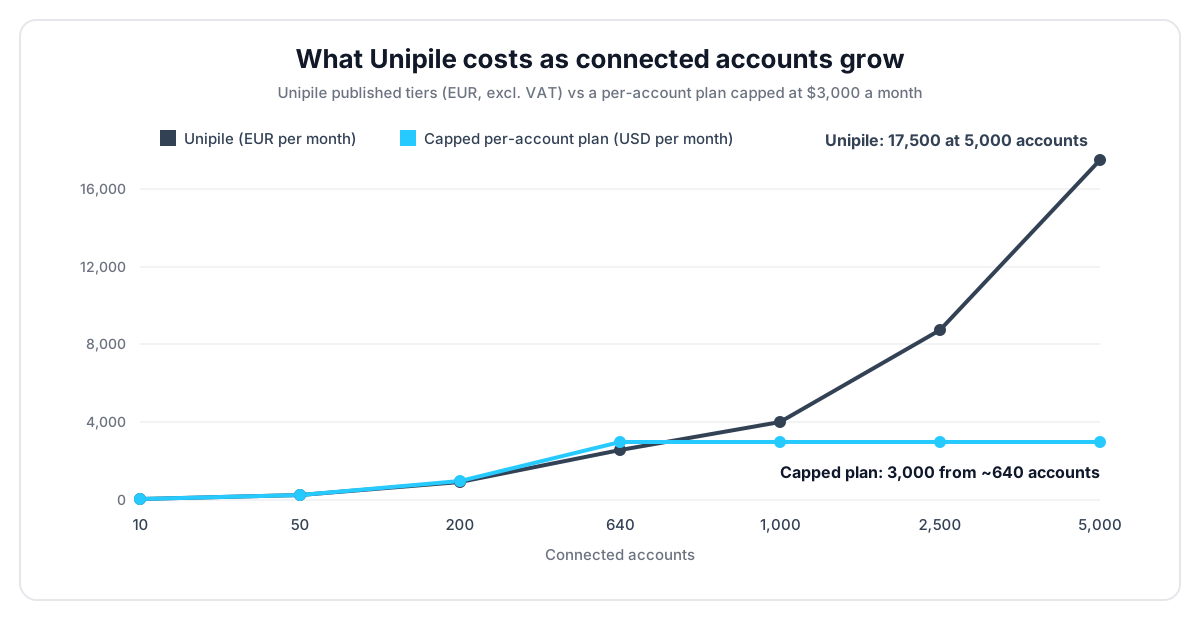
At scale, Unipile keeps growing with every account: €4,000 a month at 1,000 accounts and €17,500 at 5,000. The rate falls, but it never stops. Capped plans behave differently. The price rises with accounts up to a ceiling, then stays flat however many customers connect.
LinkupAPI is one example of a capped plan. It also bills per connected account: $55 for the first 10, then $5.50 each up to 50, $5.00 up to 200, and $4.50 beyond. From about 640 accounts, the Unlimited plan covers every account for $3,000 a month.
| Connected accounts | Unipile | Capped plan |
|---|---|---|
| 10 | €49 | $55 |
| 50 | €250 | $275 |
| 200 | €900 | $1,000 |
| 1,000 | €4,000 | $3,000 |
| 5,000 | €17,500 | $3,000 |
Below a few hundred accounts, Unipile is the cheaper option. Say so plainly. The gap flips once the ceiling applies.
A concrete case. An ATS vendor in Amsterdam lets 300 recruiters connect LinkedIn and Gmail. That is 600 linked accounts. On Unipile the €4.00 tier gives €2,400 a month, cheaper than a capped plan at that size.
Two years later the same product has 1,500 recruiters, so 3,000 accounts. Unipile now bills €10,500 a month, and every new customer adds €7. On the capped plan the invoice is still $3,000.
The trade-off is simple. Pay less while you are small, or pay a known maximum once you grow. The right answer depends on where your account count is going, not where it is today.
Is Unipile Safe for LinkedIn Accounts?
Unipile is safer than browser bots, but it is never risk-free. It runs real member sessions and ships proxy rotation and quota management. On its main API, though, it does not enforce LinkedIn limits. Pacing is up to your code.
Unipile's developer docs say it directly: "We don't enforce any limits on our side." The recommended numbers are guidance. Go above them and LinkedIn answers with errors, or worse, a restriction.
That is not a flaw. It is the plumbing model. The API does exactly what your code asks, at the pace your code asks.
What actually gets accounts restricted is behavior. Sending in bursts. Polling the inbox every hour on the dot. Connecting a brand-new profile and firing 80 invitations on day one. Logging in from a city the account has never used.
The re-authentication problem. Session drops are the other recurring pain. When LinkedIn challenges a session, the account owner has to log in again and re-link it. If those accounts belong to your customers, each drop becomes a support ticket.
Agent builders feel this first. One builder running Unipile behind Claude described the trap. When a session asks for re-authentication, the agent "could enter in a loop and burn a lot of tokens figuring it out."
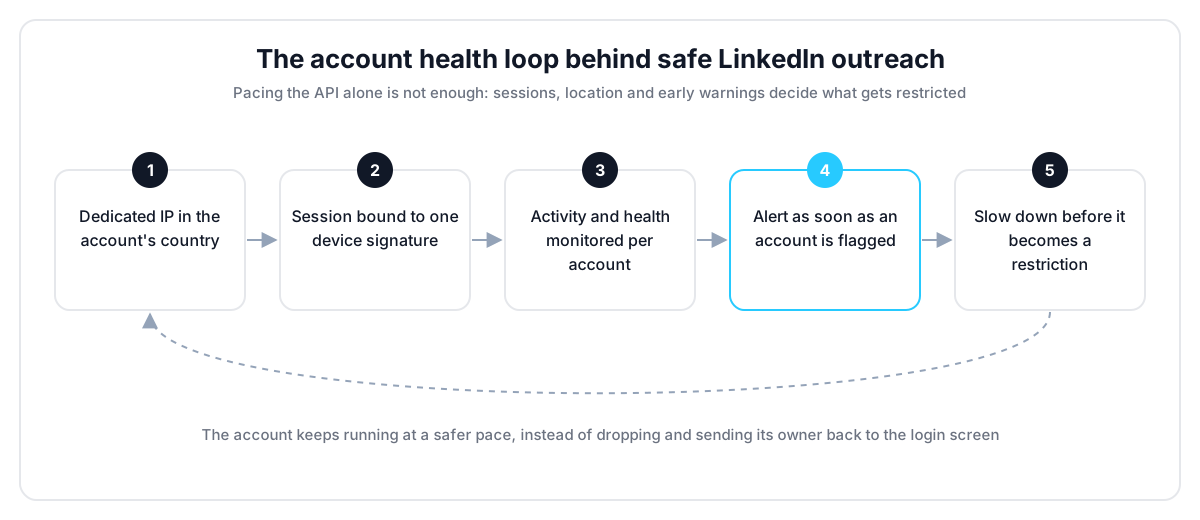
Some platforms handle this layer for you. On a managed platform like LinkupAPI, each connected account gets a dedicated IP in its own country, and the session stays bound to one device signature. The platform watches each account's activity and health, and alerts you when one gets flagged, so you slow down before it costs the account.
On data security, Unipile is strong. It is SOC 2 Type II certified, GDPR compliant, and hosts data only in France on Scaleway.
How Do You Keep LinkedIn Accounts Safe on Unipile?
Because Unipile leaves pacing to you, account safety lives in your code. Ramp new accounts slowly, randomize timing, rely on webhooks instead of polling, keep each account's location consistent, and pause on the first warning. These six rules cover most of what gets LinkedIn accounts restricted in practice:
- Ramp new accounts. Start a fresh or quiet profile at 10 to 20 invitations a day. Raise it over two to three weeks.
- Randomize timing. Space calls unevenly across working hours. Never fire a batch at 9:00 sharp.
- Use webhooks, not polling. Unipile pushes new messages and accepted invitations. Polling the same list every hour looks automated.
- Keep the location consistent. The proxy should match the country the owner usually logs in from.
- Stop on the first warning. A 429 or a challenge is a signal. Pause that account for the day instead of retrying.
- One person, one account. Do not spread one sender across several profiles to dodge limits. LinkedIn links them by behavior.
None of this is specific to Unipile. It is the cost of running real sessions. The difference between platforms is who writes this layer: your team, or the vendor.
What Are Unipile's LinkedIn Limits?
The limits are LinkedIn's, not Unipile's. On a paid LinkedIn account, Unipile recommends 80 to 100 invitations a day and about 200 a week, roughly 100 profile retrievals a day, and 1,000 search results per query. Free accounts are far tighter. The full list, per LinkedIn account:
- Invitations, paid account: 80 to 100 a day, about 200 a week, with a note up to 300 characters.
- Invitations, free account: about 5 a month with a note, and 150 a week without one.
- Profile retrievals: about 100 profiles per account per day, more with Sales Navigator or Recruiter.
- Search results: 1,000 profiles per query on standard LinkedIn, 2,500 on Sales Navigator or Recruiter.
- Free InMails to open profiles: up to 800 a month per account, often less.
Hit the weekly invitation cap and LinkedIn returns a "cannot resend yet" error. The same limit applies in the LinkedIn interface.
New accounts and profiles with fewer than about 150 connections should start lower. Unipile recommends ramping up gradually and spreading calls across working hours.
These numbers apply to every tool that runs real member sessions. No API raises LinkedIn's ceilings.
What Do Users Say About Unipile?
Users mostly like Unipile. They praise the setup speed, since most teams go live within days, and G2 reviewers often mention responsive support and ease of use. The complaints are about the bill at scale, re-authentication prompts, documentation gaps and the safety work left to the buyer, not about the core API.
The coverage gets praise too. One API for LinkedIn, WhatsApp, Instagram, Telegram and email saves real engineering time. Builders on n8n get dedicated guides and example workflows.
The complaints cluster around four things:
- Very large bills for big SaaS products. The per-account rate never stops. A product with 5,000 connected customer accounts pays €17,500 a month, and every signup adds more. At that size, pricing becomes a board-level line item.
- Re-authentication. Sessions sometimes need the account owner to log in again. At scale, that becomes a support workload.
- Documentation gaps. Some reviewers note the docs lag behind the API surface.
- Safety anxiety. In builder forums, the same question keeps coming back: "Did anyone face any issues from using Unipile?"
The forum answers are telling. Builders who went deep rarely blame the API. As one agency operator put it: "Buy the sending, build the deciding." The hard part is the safety layer around it.
Does Unipile Have Campaign or Sequence Features?
No. Unipile has no campaign or sequence object on its main API. It gives you the actions, such as invitations, messages and InMails, plus webhooks for replies. Your code decides the order, the timing, the follow-ups and the stop rules. Software teams like that control. Agencies often find it heavy.
In practice that means you build the scheduler, the follow-up logic, the reply detection and the per-account pacing yourself. Webhooks help. A new message or an accepted invitation arrives as an event, so your sequence can stop when someone replies.
For a software team, that is often the point. You keep control of the workflow. For an agency that just wants to run outbound, it is a lot of plumbing to own.
The mistake most teams make is budgeting for the API and forgetting the layer on top. The API call is a week of work. The pacing, retries and reconnection handling are the months after.
What Should You Check Before Building on Unipile?
Before you commit engineering time, check five things: your account count in two years, who owns the connected accounts, who writes the pacing layer, which channels you really need, and how an agent will call the API. These checks apply to any LinkedIn API, not only Unipile.
- Your account count in 24 months. Price the bill at that number, not today's. Per-account pricing looks different at 50 and at 5,000.
- Who owns the accounts. If they belong to your customers, every session drop reaches their inbox, not yours.
- Who writes the pacing layer. Count the weeks to build ramp-up, random delays, retries and pause rules.
- Which channels you really need. Instagram and Telegram favor Unipile. LinkedIn, email and WhatsApp alone open more options.
- How an agent will call it. An MCP server saves you from writing tool definitions for every action.
When we compare LinkedIn APIs, the first two checks decide most cases. Price and session drops scale with your success, so they deserve the most weight.
Who Should Use Unipile, and Who Should Not?
Unipile is the right call for software teams that need many channels and connect tens or a few hundred accounts. It is a weaker fit once you connect thousands of customer accounts, or when you want the platform to own account safety instead of your engineers. Here is the split:
Unipile fits you if:
- Your product needs messaging across consumer channels too: Instagram DMs, Telegram, WhatsApp, calendars.
- You connect tens or a few hundred accounts, where its per-account rate is among the lowest.
- You have engineers who want to own sequencing and pacing.
Look elsewhere if:
- You connect thousands of customer accounts and need the bill to stop growing with signups.
- Your customers cannot tolerate reconnect emails every time a session drops.
- You want account safety handled by the platform rather than built by your team.
If you are weighing options, our guide to the best Unipile alternative for LinkedIn compares them use case by use case. You can also check the full pricing of a capped plan, or see how an agent drives outreach in our guide to connecting Claude to LinkedIn.
Frequently Asked Questions
How much does Unipile cost per month?
Unipile costs €49 a month for up to 10 linked accounts. Above that, a per-account rate applies to every account: €5.00 from 11 to 50, €4.50 to 200, €4.00 to 1,000, €3.50 to 5,000, and €3.00 above. Requests are not billed, and a mailbox with its calendar counts as one account.
How much does Unipile cost for 50 or 1,000 accounts?
At 50 linked accounts, Unipile costs €250 a month. At 1,000 it costs €4,000, and at 5,000 it reaches €17,500. The rate keeps applying to every account, so there is no ceiling. Plans with a price cap, such as a $3,000 Unlimited plan, stay flat past a few hundred accounts.
Is Unipile safe for LinkedIn accounts?
Unipile runs real member sessions with proxy rotation, which is safer than browser bots. It does not enforce LinkedIn limits on its main API, so pacing is up to you. Restrictions come from behavior: bursts, new accounts sending too fast, and inconsistent login locations. Warm accounts up slowly and stay under LinkedIn's weekly caps.
What are Unipile's LinkedIn limits?
The limits come from LinkedIn. Unipile recommends 80 to 100 invitations a day and about 200 a week on a paid account, around 100 profile retrievals a day, and 1,000 search results per query, or 2,500 with Sales Navigator. Free accounts can send only about 5 invitations a month with a note.
Does Unipile have campaign or sequence features?
No. Unipile provides the actions, like invitations, messages and InMails, plus webhooks for replies and accepted invitations. Campaign logic, follow-up timing and pacing are yours to build. That suits software teams that want control, but agencies looking for a ready campaign tool usually find it heavy.
If your account count is heading into the thousands, get your API key at linkupapi.com and compare the two bills on your own numbers.

LinkedIn, email and WhatsApp through one API. Unlimited accounts, one fixed price.
Endpoints
Uptime
Avg Response