Dripify Alternative: Pricing, Quotas, and When to Switch (2026)
Dripify per-user pricing and published daily quotas, who the sequencer fits, and where an agent-first API priced per connected account, capped at $3,000 a month, is a different job.
By The LinkupAPI Team · Reviewed by Eliott · Updated
Dripify does something almost no other LinkedIn tool does. It prints its daily quotas on the pricing page: 20 connection requests a day on Basic, 75 on Pro. That honesty is rare, and it tells you what the product is. A sequencer, priced per user, with a ceiling per seat.
Most people searching for a Dripify alternative are not unhappy with the drip. They have outgrown its shape. They want an AI agent deciding who to contact, or outreach living inside their own product, or a bill that stops climbing with seats. This guide covers what Dripify costs in 2026, who it fits, and where an agent-first API is a different job rather than a rival.
Key Takeaways
- Dripify is a cloud LinkedIn drip sequencer priced per user: $59, $79, and $99 a month, or $39, $59, and $79 billed annually.
- It publishes daily quotas per plan, from 20 to 75 connection requests a day, which few tools do.
- An agent-first API is a different job: the agent decides who, what, and when, and the outreach runs inside your product.
- One thing nobody else offers: accounts from $5.50 down to $4.50 each with unlimited outreach, and a bill capped at $3,000 a month, so it stops climbing with seats.
What Is Dripify?
Dripify is a cloud-based LinkedIn automation tool that runs drip campaigns from your account, adds email steps to the same sequence, and manages replies in a dedicated inbox. You build the drip once in a drag-and-drop editor. It then runs on the vendor's servers, on a dedicated local IP, inside published daily quotas.
The product is aimed at sellers. One person, one account, one drip that keeps running whether the laptop is open or not. The sequence is fixed. Every lead walks the same steps in the same order.
How Much Does Dripify Cost in 2026?
Dripify costs $59, $79, or $99 per user a month on monthly billing, and $39, $59, or $79 per user on annual billing. Every paid plan includes LinkedIn and email sequences plus 100 email finder credits. Extra credits are sold in packs, from $29 for 1,000 up to $99 for 10,000. Enterprise is quote only.
- Basic: one drip campaign, limited quotas (20 connection requests, 30 messages, 10 InMails, 100 profile views a day), analytics, templates, 24/7 support.
- Pro: unlimited campaigns, full quotas (75 requests, 100+ messages, 30 InMails, 200+ views), a dedicated inbox, CSV export, webhook and HubSpot integration, A/B testing.
- Advanced: everything in Pro plus multi-team management, lead tagging, step analytics, evergreen campaigns, and adaptive activity control.
The quotas are Dripify's own software caps, not a figure LinkedIn publishes. That is worth crediting. The trial is 7 days, no card. Searches for "dripify pricing" doubled over the last twelve months. People are doing the math.
Who Is Dripify Built For?
Dripify is built for individual sellers and small sales teams who want a LinkedIn drip with email in the same flow, without a browser extension. If you run one account, write your own templates, and want a clean inbox, it does that job well for under $100 a month.
It helps to place it among its real neighbours, because they are not the same thing.
- Not Waalaxy. Waalaxy runs as a Chrome extension. Dripify runs in the cloud with a dedicated IP.
- Not Expandi. Expandi sits at $99 a seat with if-then branching. Dripify is cheaper at entry and publishes its quotas.
- Not HeyReach. HeyReach rotates many sender accounts under one campaign for agencies. Dripify is one user, one account, one drip.
- Not an API. There is a webhook and a Zapier connector, but the product is the interface. You cannot hand the sequence to an agent or embed it in software you sell.
Why Does a Fixed Drip Differ From an Agent That Decides?
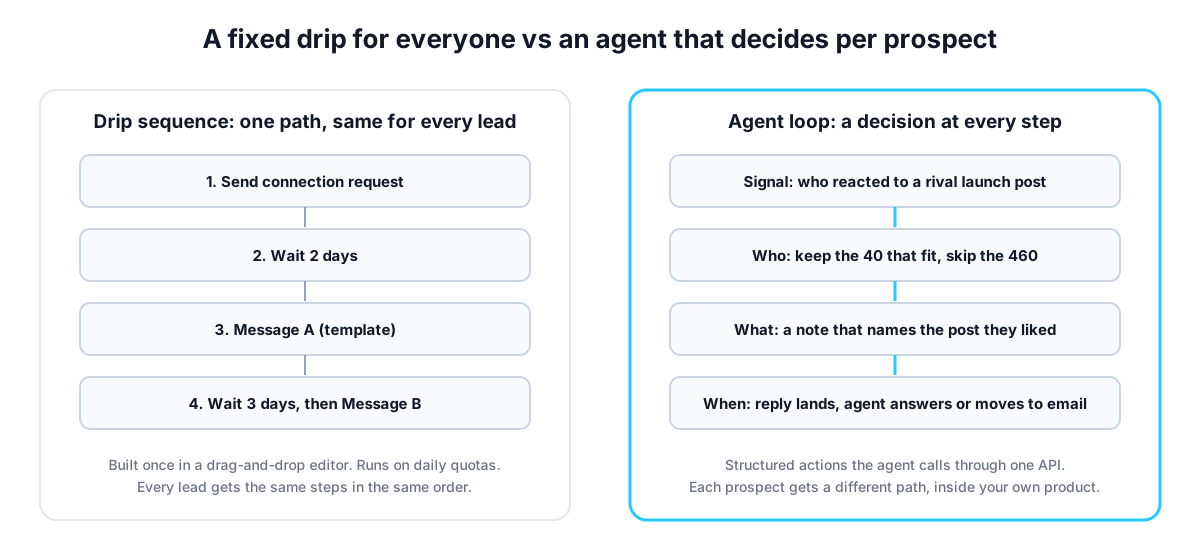
A drip applies one path to every lead. An agent makes a decision at each step: who is worth contacting, what to say to this person, and when to follow up. The difference shows up in reply quality, not in send volume. The drip is faster to set up. The agent is harder to ignore.
A two-rep team at a Series A dev-tools startup points an agent at everyone who reacted to a rival's launch post last week. The API returns about 500 reactions. The agent qualifies them against the ICP and keeps 40 engineering managers.
Each of the 40 gets a connection note that names the post they reacted to. When one replies, the agent answers. When one goes quiet for five days, it looks up a work email and follows up there. The other 460 never hear from it.
Try that in a drip. You can import the 500, but the sequence cannot tell the 40 from the 460, cannot write a different first line for each, and cannot move one thread to email. A note about something the prospect did yesterday lands while they still remember it. A template lands like every other template.
Why Is an Agent-First API a Different Job?
An agent-first API gives a model structured LinkedIn actions to call: search people, send a request, message, react, pull the people who engaged with a post, find a work email. The agent chains them. Builders embed the result in their own product, so their users never open a second tool.
That is a different job from a sequencer, and it is honest to say so. Dripify is for a person running outreach. The API is for a team building something that runs outreach for other people, or for an agent that runs it for them.
Take a recruiting SaaS with 300 agency customers whose roadmap says "message candidates from inside the product". A drip tool cannot be embedded; each customer would need a seat and a login somewhere else. With an API, the product connects each customer's account and the feature ships as a button. As one founder building exactly this put it: "I don't want to send my users to another tab. The outreach has to feel like part of what they already paid for."
The second case is the agent itself. Any MCP-compatible agent reads the list of actions and uses them, through the user's own authenticated LinkedIn session, at the pace one session allows. No glue code.
What Changes When Pricing Has a Ceiling?
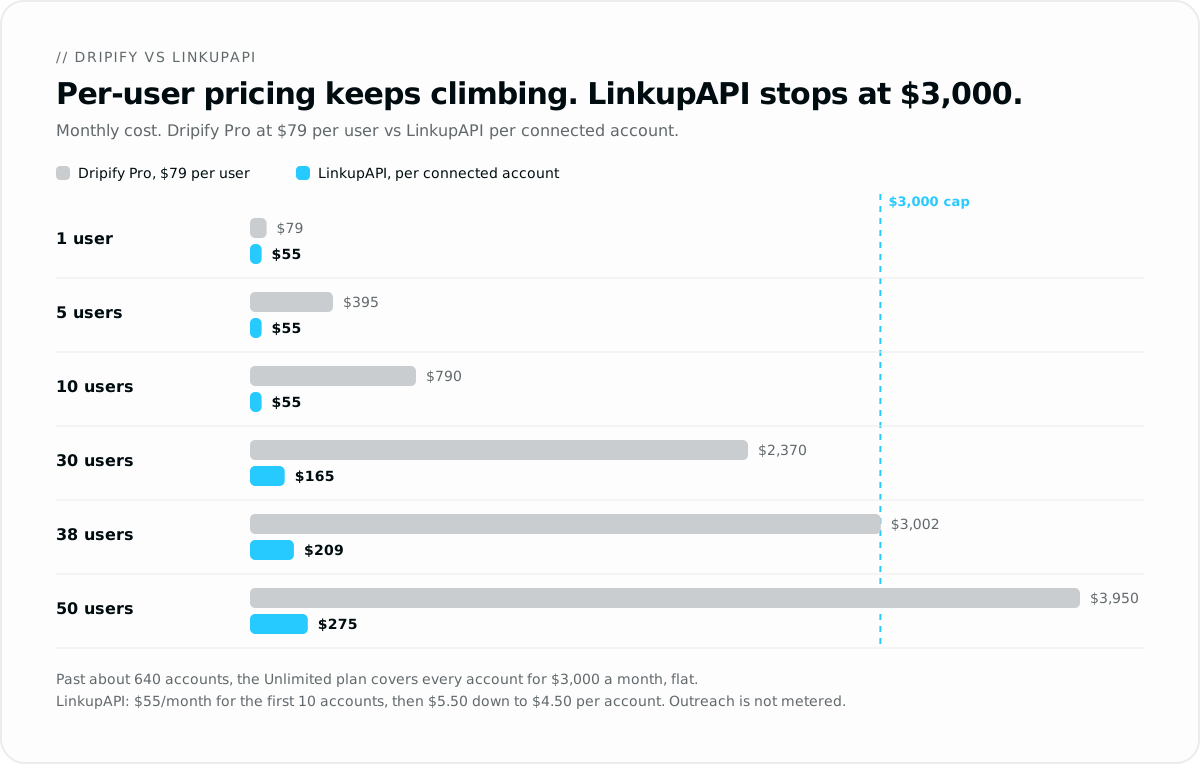
The bill grows slowly, then stops. Dripify charges per user, so 38 users on Pro at $79 cost about $3,002 a month, and 50 cost $3,950. LinkupAPI charges per connected account: $55 a month covers the first 10, then $5.50 each up to 50, $5.00 up to 200 and $4.50 beyond, with unlimited outreach on every account. 38 accounts cost $209 a month and 50 cost $275. The bill is capped at $3,000: the Unlimited plan covers every account for that flat price, and past about 640 accounts every extra one is free.
One more thing about the word unlimited. No tool in this category sells a true unlimited plan. HeyReach's top tier, for example, is capped at 500 senders under a fair-use policy, in the words of its own blog, and the terms above that are negotiated. One agency running about 900 accounts told us its bill there was already above $3,500 a month. The $3,000 Unlimited plan has no fair-use cap on connected accounts. That is the whole point of the ceiling.
For a small team, price is not the reason to switch, and that deserves plain words. Five reps on Dripify Pro pay $395 a month. Five accounts here cost $55, but that buys an API, not a drip UI. A five-rep team that wants a visual sequencer has no reason to switch.
- Pro at $79: about 38 users to reach $3,000.
- Advanced at $99: about 30 users.
- Pro billed annually at $59: about 51 users.
Smaller runs start at $55 a month for up to 10 connected accounts. When we tested this with an agency onboarding its twelfth client, the question was never features. It was what the twelfth account would add to the bill. Here it adds $5.50. On a per-seat tool, it adds another full seat.
Setup takes about ten minutes. Get your API key at linkupapi.com, connect one account, and run a first search before you judge it.
The Honest Case for Staying on Dripify
Stay on Dripify if you are a seller who wants a visual drip, one account, and email in the same sequence. It publishes the clearest quotas in the category, runs in the cloud with a dedicated IP, and costs under $100 a month. For that job, an API is the wrong shape.
Stay too if you have never written a prompt, if your team is under ten people each running their own account, or if you need a HubSpot push and a shared inbox today rather than an agent next quarter.
The mistake most teams make is switching tools to fix a targeting problem. If the list is cold, an agent will write better notes to the wrong people. Fix who you contact first.
How Do You Run a Side-by-Side Test?
Run the same target list through both for one week: a Dripify drip on one side, an agent calling structured actions on the other. Compare replies, not sends. The API side is one key, one connector, one prompt, and a routine to keep it running.
- Get your API key at linkupapi.com. You pay per connected account, from $55 a month for the first 10, and the bill stops at $3,000 on the Unlimited plan.
- Connect the MCP server in your agent. In Claude, that is Settings, then Connectors. The same server works with any MCP-compatible agent; ChatGPT connects through Custom GPT Actions.
- Paste a test prompt: "Pull everyone who commented on our competitor's pricing post this week, keep the 30 who are heads of sales at 50 to 500 person SaaS companies, and send each a connection note that mentions their comment."
- Turn the conversation into a scheduled routine, daily or weekly, so the agent checks replies, follows up by email after five quiet days, and picks up new reactions on its own.
The pattern is the one used to connect LinkedIn to your product, and the developer-side comparison lives in the Unipile alternative guide.
Frequently Asked Questions
How much does Dripify cost?
Dripify costs $59, $79, or $99 per user a month on monthly billing, or $39, $59, or $79 per user when billed annually. All paid plans include LinkedIn and email sequences and 100 email finder credits a month. Extra credit packs run from $29 for 1,000 to $99 for 10,000. Enterprise is priced on request.
Is Dripify safe for my LinkedIn account?
Dripify runs in the cloud on a dedicated local IP, spaces actions with human-like timing inside working hours, and publishes daily quotas per plan, from 20 to 75 connection requests. Advanced adds adaptive activity control. Those are the vendor's own caps. Any automation carries some risk; modest daily volume is what keeps an account healthy.
Does Dripify have an API?
Dripify offers webhooks, a Zapier connector, CSV export, and a native HubSpot integration on Pro and above. Its pricing page does not advertise a public REST API for sending actions. If you need to call LinkedIn actions from your own code or from an AI agent, that is a different category of tool.
What is the best Dripify alternative for AI agents?
An agent-first API is the closest fit: structured actions for search, connection requests, messages, post reactions, and email lookup that any MCP-compatible agent can call. LinkupAPI does that with unlimited outreach on every connected account, from $55 a month for the first 10 accounts, and a $3,000 Unlimited plan that stays flat however many accounts you add.
Dripify vs LinkupAPI: what is the difference?
Dripify is a finished sequencer for sellers: a visual drip, one account per user, priced per seat. LinkupAPI is an API for builders and agents: the agent decides who, what, and when, the outreach runs inside your product, and pricing is per connected account, from $5.50 down to $4.50 each, capped at $3,000 a month. Different jobs, not rivals.
Dripify already does the seller's job well. If your job is an agent or a product, the shape changes. Get your API key at linkupapi.com, connect one account, and see what a decision at every step does to your reply rate.
