LinkedIn API Integration for Developers (2026 Guide)
LinkedIn API integration for developers in 2026: the three routes, which to pick, and real code (cURL + Python) to ship the one that actually sends.
By The LinkupAPI Team · Reviewed by Eliott · Updated
You decided to add LinkedIn to your product. You open the official docs and hit a wall: OAuth scopes, partner review, Rest.li, a token that expires in 30 minutes. Hours later you still cannot send a single connection request.
That is the gap this guide closes. For developers, LinkedIn API integration splits into three very different routes, and only one of them lets your product actually send on a user's account. Here is how to pick the route, and real code to ship the practical one.
Short answer: the official LinkedIn API handles sign-in and your own posts, not outreach. To search people and send requests or messages from your app, you integrate an account-based API that acts through the user's authenticated session. To only read data at scale, you integrate a data API.
Key Takeaways
- LinkedIn API integration has three routes: the official API (sign-in, own posts), an account-based API (search and send on a connected account), and a data API (read at scale).
- The official API cannot send connection requests or messages to other members, even after partner approval.
- An account-based API integrates over a REST call with an
x-api-keyheader, or over an MCP server an AI agent calls directly. - Pick the route by the job your product does: act on an account, or only read.
What does LinkedIn API integration actually mean?
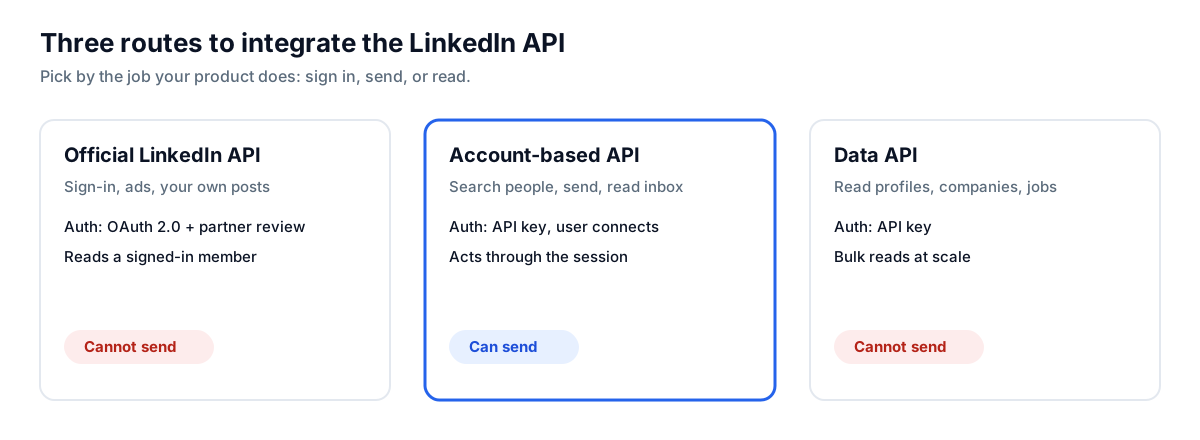
LinkedIn API integration means wiring one of three separate products into your app: the official LinkedIn API, an account-based outreach API, or a B2B data API. Each authenticates differently and does a different job. The route you pick decides what your product can do.
Most teams assume there is one "LinkedIn API." There is not. The confusion costs weeks.
The official API, documented on Microsoft Learn, is built for sign-in, ad management, and posting to your own feed. It uses OAuth 2.0 and, per LinkedIn's developer docs as of October 2026, has no generally available endpoint for messaging another member. Partner programs widen access to ads and recruiting data, not open outreach.
An account-based API fills that gap. It acts through a LinkedIn account your user connects, so your product can search people, send invitations, and message connections at the pace a single session allows.
A data API is the third route. It returns profiles, companies, and jobs as structured records for reading, never for sending.
Which LinkedIn API should you integrate?
Integrate by the job, not the brand. If your product sends on LinkedIn, you need an account-based API. If it reads records in bulk, you need a data API. If it only signs users in or posts your own updates, the official API is enough. The table maps the three routes.
| Route | What it integrates for | Auth | Can send? |
|---|---|---|---|
| Official LinkedIn API | Sign-in, ads, your own posts | OAuth 2.0, partner review | No |
| Account-based API | Search people, send invites and messages, read inbox | API key, user connects an account | Yes |
| Data API | Read profiles, companies, jobs at scale | API key | No |
The expensive mistake is integrating a data API, then discovering it cannot send, and bolting a second tool on top. Decide the job first.
For the full comparison of every option by category, see our guide to the best LinkedIn API.
Why is the official LinkedIn API so hard to integrate for outreach?
The official API is hard for outreach because it was never built for it. It gates access behind partner review, scopes each permission tightly, and exposes no messaging endpoint for reaching other members. You can integrate it in a weekend for sign-in, and still never unlock a single outbound message.
The authentication alone stops most teams. Per LinkedIn's developer docs, a token from the client credentials flow lives 30 minutes, and member actions need the 3-legged OAuth flow with a member's consent. That is correct for reading a signed-in member's own data.
It is the wrong tool the moment your product needs to act on a prospect who never installed your app. No scope grants that. This is the boundary the next route crosses.
How do you integrate an account-based API in code?
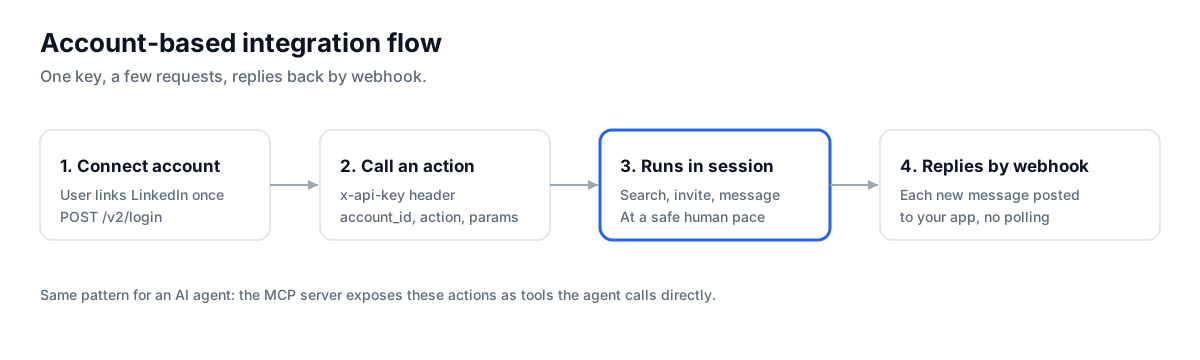
You integrate it in three calls: connect the user's account once, then POST an action to the matching endpoint with your key. The API acts through the connected session and returns structured JSON. No OAuth dance, no partner review, and the same key opens every action.
Step one, your user connects their account. You send the connection token to the login endpoint.
curl -X POST https://api.linkupapi.com/v2/login \
  -H "x-api-key: YOUR_API_KEY" \
  -H "Content-Type: application/json" \
  -d '{"platform": "linkedin", "login_token": "USER_TOKEN", "country": "US"}'
Step two, search for people. Every action uses the same body shape: an account_id, an action, and its params.
import requests

BASE = "https://api.linkupapi.com/v2"
HEAD = {"x-api-key": "YOUR_API_KEY", "Content-Type": "application/json"}

r = requests.post(f"{BASE}/network", headers=HEAD, json={
    "account_id": "acc_123",
    "action": "search_people",
    "params": {"title": "VP Sales", "location": "London", "limit": 25},
})
people = r.json()["data"]
Step three, send a connection request to each match. Same pattern, different action.
for p in people:
    requests.post(f"{BASE}/network", headers=HEAD, json={
        "account_id": "acc_123",
        "action": "send_invitation",
        "params": {"profile_id": p["id"], "note": f"Hi {p['first_name']}, ..."},
    })
Replies come back to your app through webhooks, so you never poll. Register a webhook endpoint once and the API posts each new message to it. Current endpoints and pricing are on the pricing page.
How do you integrate LinkedIn with an AI agent through MCP?
You integrate it by pointing the agent at an MCP server instead of writing REST calls. MCP, the Model Context Protocol from Anthropic, lets an agent discover and call tools in plain language. The agent sees actions like search people or send message and runs them, with no glue code.
This is the route to pick when the caller is Claude, Cursor, or a custom agent rather than your backend. You register the server once, authenticate the account, and the agent handles the reasoning while the server handles the LinkedIn side.
For a step-by-step setup, our guide on connecting Claude to LinkedIn walks through the connector. ChatGPT is the one exception: it uses Custom GPT Actions over the same REST API instead of MCP.
A recruiting-tool team ran this cleanly. They skipped a backend integration entirely, pointed Claude Code at the MCP server, and shipped candidate outreach as a feature in two days. The agent searches, drafts, and sends; the connector carries each action through the user's session.
What LinkedIn API integration is NOT
Clearing up the boundaries saves a wrong build. Three things an account-based integration is not.
- Not a browser automation tool. Phantombuster or Dripify replay clicks in a headless browser. An account-based API gives your product the action itself, over a request, not a recorded macro that breaks when the page changes.
- Not a workflow builder. Make, n8n, and Zapier chain triggers between apps. Here your code or your agent decides who to contact and what to say, then calls the action directly.
- Not a data dump you run yourself. The account-based route sends and reads through a real session. For bulk reading only, a data API is the right integration, and the two can pair.
Who should integrate which route?
Match the route to what you are building. The split is clean once you name the job your product does for its users.
Best for, not for. An account-based integration fits a product whose users send from their own LinkedIn accounts: a CRM, an ATS, a sales-engagement tool, or an AI SDR. If you only enrich a static list once a quarter, a data API is cheaper and enough. If you only need sign-in, the official API is the right size and you can stop reading.
The trade is real. You give up the ready-made dashboard of a no-code tool, and you get outreach your product controls end to end. For most builders embedding outreach, that control is the point.
A few concrete fits:
- A sales-engagement SaaS adds LinkedIn to its email sequences, connecting one account per customer.
- An ATS lets recruiters send connection notes to candidates from inside the product.
- An AI GTM agent searches, enriches, and sends across LinkedIn and email in one run.
How much does account-based integration cost at scale?
Cost is set by the pricing model, not the entry price. Account-based APIs bill per connected account or per seat, so the number that matters is how many end-user accounts your product will connect. Model that first, because switching an integration after launch is painful.
Per-seat pricing is clean for a handful of accounts and climbs with every one you add. A flat-ceiling model behaves differently: it charges per account up to a cap, then stops. At twenty accounts the models look close. At two hundred, they are a different universe. The detail is in our LinkedIn API pricing guide.
Run the math on the account count you expect in a year, not the one you launch with.
How do you ship your first integration this week?
You ship it by connecting one account-based API and calling it from your product or an agent. The whole loop is one key and a few requests, or one MCP connector in Claude or Cursor.
- Get your API key at linkupapi.com. Every plan opens all endpoints, so start small for the test.
- Connect it: call the REST endpoints directly from your backend, or add the MCP server in your agent. For ChatGPT, use Custom GPT Actions over the same REST API.
- Run the first play from your own account: search a set of people, send a connection request with a personal note, then message the ones who accept. The message endpoint and the LinkedIn automation API are the core.
- Make it recurring without a cron job: Claude Cowork runs the workflow on a schedule from claude.ai, and Claude Code routines do the same for technical teams. No external workflow tool needed.
Get your API key at linkupapi.com and ship your first connected request this week.
LinkedIn API Integration: Your Questions Answered
Is there an official LinkedIn API for developers, and what can it do?
Yes, documented on Microsoft Learn. It covers sign-in, ad management, Pages, and posting to your own feed, over OAuth 2.0. It has no generally available endpoint for messaging or connection requests to other members, even after partner approval. For outreach, developers integrate an account-based API instead.
How do you integrate a LinkedIn API into your product?
Pick the route for your job. For outreach, connect an account-based API: your user links their account once, then your backend POSTs actions with an API key, or an AI agent calls them over MCP. Replies return through webhooks, so your product reacts without polling.
Is the LinkedIn API free?
The official API is free to call but gated by partner access most products never clear. Account-based and data APIs are paid, priced per connected account, per seat, or per credit. There is no free tier for production outreach, though most providers let you test before committing.
Can you integrate the LinkedIn API with Python?
Yes. An account-based API is a plain REST service, so any language works. In Python you POST to the endpoint with an x-api-key header and a JSON body of account_id, action, and params. The same pattern covers search, invitations, messages, and email enrichment.
Can I build my own LinkedIn integration instead?
You can for sign-in and your own posts, through the official API. For sending on another member's behalf, a self-built browser script is the path that gets accounts flagged and breaks on every layout change. An account-based API carries those actions through a real session at a safe pace instead.
